
Smart TV Game Development with JavaScript and React: A Complete Guide
Introduction
The Smart TV market is no longer just about streaming movies. Its apps have evolved from simple interfaces into interactive platforms. If you’re already building HTML-based TV apps, adding lightweight games is an easy way to increase user engagement. In e-commerce apps, games are often used to keep users engaged for longer.
Here’s the thing. You don’t need a new tech stack. Most Smart TVs run web apps under the hood, so you can build games using JavaScript and React, just like you do for the browser.
How JavaScript and React Games Run on Smart TVs?
Many Smart TVs run apps using built-in browser engines. This includes platforms like Samsung, LG, VIDAA, Vizio, etc.
- Samsung (TizenOS) runs apps in a Chromium-based environment.
- LG (webOS) uses a web runtime for HTML apps.
- Vizio (SmartCast) is mostly web-based.
- VIDAA/Hisense Smart TV
A Smart TV game is essentially a web app running on a TV screen. The key is to keep it simple, minimize navigation, and ensure it’s well optimized. So the stack becomes:
- React for UI
- JavaScript for logic
- HTML5 Canvas or DOM for rendering
- Optional: Phaser, PixiJS, or Kontra.js for advanced rendering
Types of Games That Work Well on Smart TVs
Not every game works well on a TV. You’re using a remote, not a touchscreen or keyboard. So the experience needs to be simple and easy to control. Here are the best types of games:
- Grid-Based Games – Work well with directional keys and don’t need fast physics.
- Examples: 2048, Tic Tac Toe, Puzzle boards
- Turn-Based Games – Fit the living room experience. No time pressure. Easy to play.
- Examples: Trivia quizzes, Card games, Strategy games
- Casual Arcade Games – Keep them slow and easy to control.
- Examples: Snake, Catch the object, Simple reaction games
- Reward-Based Games – These are a great fit for shopping apps and user engagement.
- Examples: Spin the wheel, Scratch cards, Slot style games
Key Considerations for Smart TV Game Development
Before you start building, remember that a TV is very different from a phone or a laptop. The way users interact changes everything.
- Remote First Design: Everything revolves around a few buttons:
UP, DOWN, LEFT, RIGHT, OK, BACK
There’s no touch or mouse. Navigation must be simple and predictable, and every action should be accessible using the directional keys or D-pad.
- Focus Management: TV apps don’t have a cursor. They rely on focus. These should always be clearly visible:
-
- Selected item
- Active button
- Current position
If users can’t see where they are, the experience breaks instantly.
- Performance Constraints: Smart TV hardware is limited. Focus on smooth performance rather than heavy visuals.
-
- Avoid heavy animations
- Reduce React re-renders
- Keep the DOM small
- Use Canvas for smoother animations
- 10-Foot UI Design: Users sit far from the screen, so readability matters.
-
- Large tiles and buttons
- High contrast colors
- Big, readable fonts (at least 24px)
- Proper spacing between elements
- Optimizing React Rendering: Key Points to Consider When Using React.js for Development.
-
- Use memoization where needed
- Avoid unnecessary state updates
- Prefer simple UI structures
Example: Building 2048 Game in React for Smart TV
2048 is an ideal Smart TV game because it uses a simple grid layout, works entirely with arrow keys, and runs smoothly even on limited hardware. Its addictive gameplay keeps users engaged without requiring complex interactions or advanced controls.
Game Overview
The game is played on a 4×4 grid where numbered tiles slide in different directions. When two tiles with the same number collide, they merge into one. After each move, a new tile appears. The objective is to strategically merge tiles until reaching the 2048 tile while avoiding a full grid.
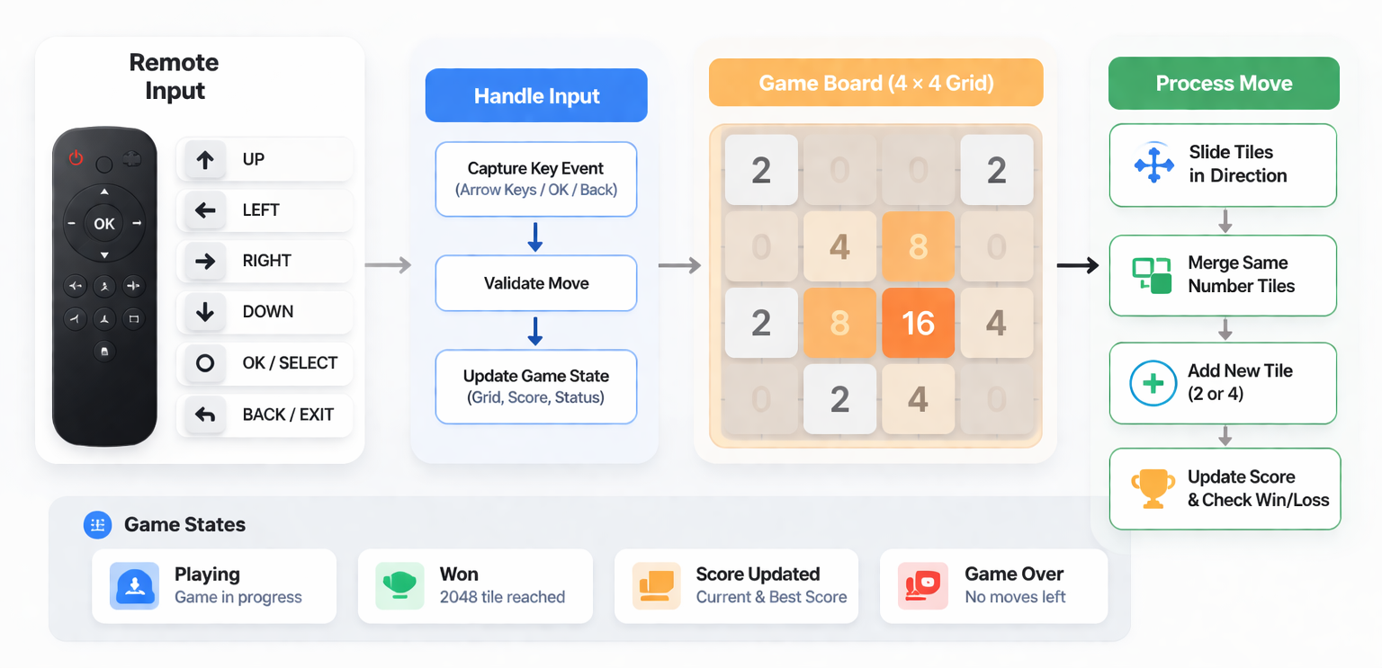
2048 Game flow diagram
Development Logic
- Game State: 4×4 grid (empty represents 0), score, best score, and game state: playing, won, or game over.
- Turn Flow: User picks a direction → User presses a direction → tiles slide → same tiles merge once, If grid changes → add new tile (2 or 4) + update score, If no change → do nothing.
- Win & Game Over: Win when a tile reaches 2048 (can continue), Game over when no moves are left.
- Input & UI: Remote keys for movement, Enter for select, Back for exit. Focus switches between the board and buttons. Throttle input to avoid repeated moves.
- Persistence: Best score, total games, last few results saved and restored.
- Display: Grid rendered on canvas with simple animations for moves and merges.
- Platform: Same logic everywhere, only key mapping differs (LG vs Samsung).
Here is the GitHub link to the source code Game-2048
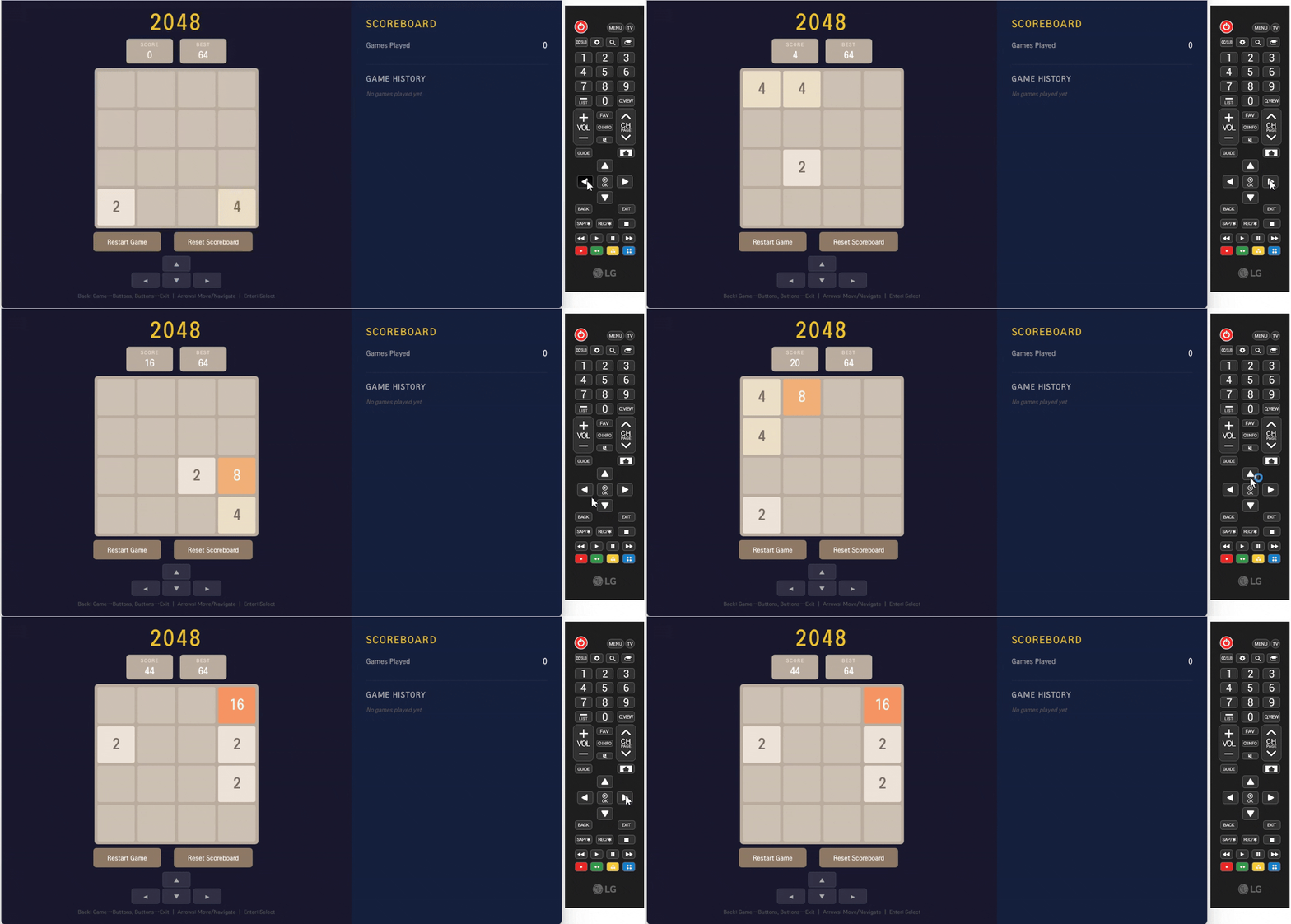
2048-Game gif
Testing on Smart TVs
Use platform tools:
- Samsung Tizen Studio
- LG webOS TV SDK
Always test on a real device, as remote responsiveness differs, performance varies, and focus behavior can be disrupted.
Conclusion
Smart TV game development is less about complex gameplay and more about getting the basics right. You’re designing for simplicity, control, and performance. That means focusing on remote-friendly interactions, keeping sessions short and engaging, using lightweight rendering, and making sure focus and navigation are always clear. Games like 2048 work so well because they naturally fit how users interact with a TV. When built with JavaScript and React, they can be added to existing apps without major changes. In e-commerce apps, adding rewards to gameplay can improve user retention and even drive conversions. The approach is simple. Start small, optimize for the platform, and build something that feels natural on a TV screen.

