GCP: Building a RAG Pipeline with AlloyDB AI and Vertex AI
One Database, Infinite Context: Why Your Next RAG App Should Start in SQL:
The biggest challenge in Generative AI is “hallucination.” Retrieval-Augmented Generation (RAG) solves this by giving an LLM access to your private data. While most RAG stacks require complex Python “glue code,” Google Cloud’s AlloyDB AI allows you to handle the entire retrieval logic directly inside the database using SQL.
The Architecture:
Instead of moving data to a separate vector database, we use AlloyDB as a unified store for both operational data and vector embeddings.
- Ingestion: Raw data is stored in AlloyDB.
- Embedding: AlloyDB calls Vertex AI via SQL to generate vectors.
- Retrieval: A user query is converted to a vector; AlloyDB performs a similarity search.
- Generation: The context + query are sent to Gemini to produce the final answer.
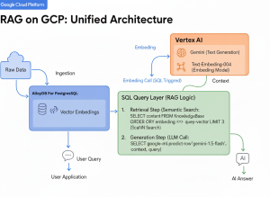
RAG Architecture On GCP
Step 1: Dependencies & Setup
To start, we enable the AI integrations directly in the AlloyDB shell. This allows the database to “talk” to Vertex AI models.
SQL:
-- Enable vector support and Google ML integration

CREATE EXTENSION IF NOT EXISTS vector;

CREATE EXTENSION IF NOT EXISTS google_ml_integration;


-- Grant permissions to access Vertex AI models

-- (Ensure the AlloyDB Service Agent has 'Vertex AI User' IAM role)

SET google_ml_integration.enable_model_support = 'on';
Step 2: Corpus (Automatic Vector Generation)
You don’t need a separate script to embed data. Use a Generated Column in AlloyDB to create embeddings automatically whenever data is added.
SQL:
-- Create a table for documentation

CREATE TABLE support_docs (

    doc_id SERIAL PRIMARY KEY,

    content TEXT,

    content_embeddings vector(768)

    GENERATED ALWAYS AS (

        embedding('text-embedding-005', content)

    ) STORED

);
Note: text-embedding-005 is a native Vertex AI model accessible directly via the embedding() function.
Step 3: High-Performance Semantic Search
For production scale, standard search is too slow. We apply the ScaNN (Scalable Nearest Neighbors) index, which is the same technology powering Google Search.
SQL:
-- Create a ScaNN index for sub-millisecond retrieval

CREATE INDEX doc_index ON support_docs

USING column_store (content_embeddings)

WITH (index_type = 'ScaNN');


-- Perform a similarity search

SELECT content

FROM support_docs

ORDER BY content_embeddings <=> embedding('text-embedding-005', 'How do I reset my API key?')

LIMIT 3;
Step 4: Augment and Generate (Grounding)
In a traditional app, you’d send these results to an LLM. With AlloyDB AI, you can call Gemini directly from the database to summarize the answer.
SQL

-- Use ml_predict_row to get an answer from Gemini 1.5 Flash

SELECT

  google_ml.predict_row(

    'projects/YOUR_PROJECT/locations/us-central1/publishers/google/models/gemini-1.5-flash',

    json_build_object('contents',

        json_build_object('role', 'user', 'parts',

            json_build_object('text', 'Answer using this context: ' || content || ' Question: How do I reset my API?')

        )

    )

  )

FROM support_docs

ORDER BY content_embeddings <=> embedding('text-embedding-005', 'How do I reset my API key?')

LIMIT 1;
Key Takeaways
- Zero ETL: No need to sync your database with an external vector store like Pinecone
- SQL-First: Any developer who knows SQL can now build a production-grade AI app.
- Google Scale: Uses ScaNN to search through millions of vectors in milliseconds.
Conclusion
It’s super fast. There’s no need to set up external vector databases or complex Python middleware. By using AlloyDB as the “Memory” and Vertex AI as the “Brain,” we can build a running project that is 70% simpler than traditional stacks.