


Introduction
If you’ve ever worked with Kafka, you know the problem: data grows fast. Every click, impression, or event adds up, and before you know it, your Kafka broker’s disks are full. Disk is not very cheap on AWS, and storing everything on expensive broker storage is costly, and scaling up to handle growth feels like throwing money at the problem without fixing it.
For one of our Ad-Tech clients at TO THE NEW, we were already utilising AWS MSK to reduce Kafka expenses significantly. But we found that we could save even more money if we moved our old Kafka data to S3 and could keep high availability & reliability at the same time.
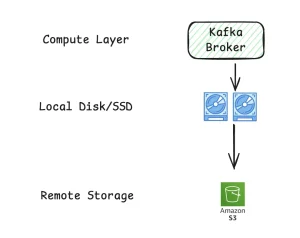
Kafka Tiered Storage
This is where tiered storage comes into the picture. In this blog, we will see how tiered storage in Amazon MSK can help.
The Problem
Imagine your Kafka brokers like a desk. You’re working on daily tasks, so your desk needs space for papers you’re actively using. But over time, old documents pile up. If you don’t archive them, your desk is cluttered, and finding what you need slows down.
That’s exactly what happens in Kafka without tiered storage. All messages – old and new sit on the broker disks. Performance is fine at first, but costs go up, and scaling becomes painful.
The Idea: Tiered Storage
Tiered storage is like adding a filing cabinet to your desk. Older documents are moved to the cabinet (cold storage, in S3) while the papers you are currently using are kept on the desk (hot storage). They don’t require expensive desk space, but you can still access them if necessary.
Now, in Kafka’s words:
- Hot storage: For quick access, recent messages remain on brokers.
- Remote Storage: Older messages are automatically moved to S3 for cold storage.
This lets you retain all your data without paying for huge broker volumes.
How It Works
Here’s the learning flow if you want to implement it:
- Cluster Requirements
– Kafka version 3.8+ (supports tiered storage)
– Broker instance is large enough to handle hot storage. - Configure Retention Policies
– local.retention.ms → how long data stays on brokers.
– retention.ms → total retention including S3 - Enable Remote Storage on Topics
– remote.storage.enable=true for topics that need tiered storage
Terraform for MSK
Automate cluster configuration and monitoring:
resource "aws_msk_cluster" "demo_tiered_msk_cluster" {
cluster_name = "tiered-storage-msk-cluster"
kafka_version = "3.8.1"
number_of_broker_nodes = 2
enhanced_monitoring = "PER_BROKER"

broker_node_group_info {
instance_type = "m7g.large"
storage_mode = "TIERED"
}
}
Configuring Kafka Topics for Tiered Storage
# Update retention to 3 days
while read -r t; do
kafka-configs.sh --bootstrap-server <bootstrap-server> \
--alter --entity-type topics --entity-name "$t" \
--add-config retention.ms=259200000
done < topics.txt

# Enable remote storage
while read -r t; do
kafka-configs.sh --bootstrap-server <bootstrap-server> \
--alter --entity-type topics --entity-name "$t" \
--add-config remote.storage.enable=true
done < topics.txt

# Set hot storage retention to 4 hours
while read -r t; do
kafka-configs.sh --bootstrap-server <bootstrap-server> \
--alter --entity-type topics --entity-name "$t" \
--add-config local.retention.ms=14400000
done < topics.txt
These commands make sure your Kafka topics:
- Keep recent data on brokers (hot storage) for fast access.
- Move older data to S3 (remote storage) automatically.
- Respect retention rules so you don’t run out of expensive broker disk space.
Testing and Validation
When moving to tiered storage, make sure:
- Consumer applications read Kafka data work without errors
- ETL processes can read both hot and cold data
- Brokers are not overloaded during the transition
Think of it like checking your filing system – make sure papers you need are still easy to access even after you archive old ones.
Keeping an Eye on Tiered Storage Metrics
When you enable MSK tiered storage, there are two key metrics worth watching:
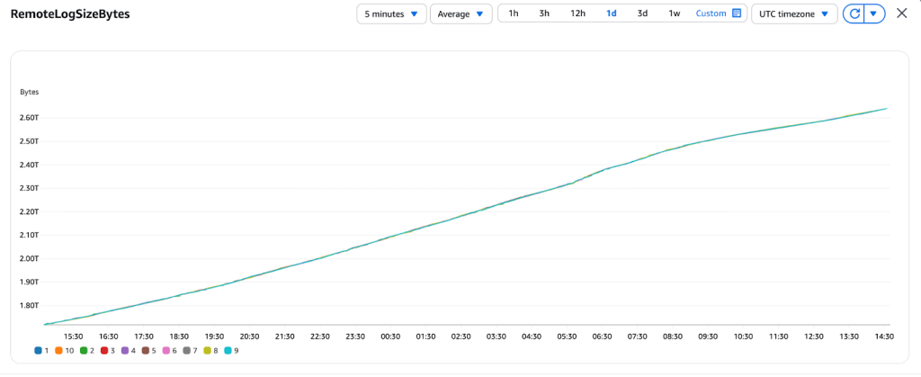
- RemoteLogSizeBytes – This metric shows how much data is currently stored in S3 (the “filing cabinet”). It goes up as old messages are moved from brokers.
RemoteLogSizeBytes
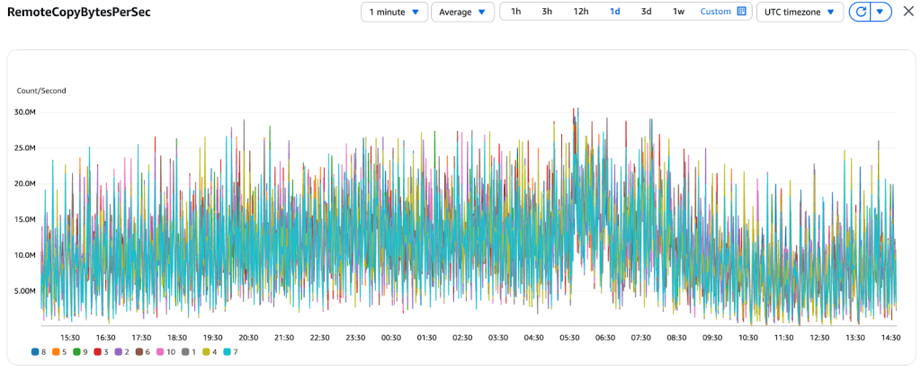
- RemoteCopyBytesPerSec – This tells us the speed at which data is being copied from brokers to S3. If this number is high, a lot of old messages are being archived right now. If it’s very low, the process might be slow or paused.
RemoteCopyBytesPerSec
Keeping an eye on these metrics helps us to understand how tiered storage is performing and ensures your cluster stays efficient and cost-effective.
Best Practices For Using Tiered Storage
- Keep hot storage for the data your applications need to process quickly.
- Use S3 for historical or compliance-related data.
- Monitor usage to make sure retention policies match your data and cost goals.
- Test in lower environments before applying changes in production.
Why It Saved Money
Before enabling tiered storage:
- We were running huge EBS disks on brokers to store everything
- Costs were high, and scaling up meant spending more
After enabling tiered storage:
- Only the most recent hours’ worth of data remain on the broker’s disk after tiered storage is enabled. This results in smaller EBS volumes and lower costs.
- Transferring older data to S3 is significantly less expensive and still readily available when needed.
- Our Kafka cluster stays fast without spending a fortune
Why It Matters
- Cost savings: Less broker storage = lower AWS bills
- Better scaling: Only hot storage needs to scale with traffic
- Kept it Simplified: MSK automatically moves old data to S3 without any manual intervention.
Takeaway
At TO THE NEW, one of our ad-tech team members faced this exact problem. Disks were expensive, and clusters were growing fast. By using MSK tiered storage, we moved old data to S3 while keeping recent data on brokers. Costs dropped, clusters stayed fast, and the system scaled effortlessly.
Lesson: When dealing with high-volume Kafka data, tiered storage is like having a filing cabinet for your desk. Keep what you need handy, archive the rest, and you’ll save money while keeping everything accessible.