


Three months into building our DevOps AI agent, I gave a demo of it to the team. Checked pods, read logs, suggested fixes. Everyone was impressed. Then one engineer asked it: “Remember that ingress issue we sorted on Tuesday?”
The agent had no idea what she was talking about.
I had spent weeks on tool integration, prompt engineering, safety guardrails. I had not spent a single hour thinking about memory. And that gap made the whole thing feel like a toy instead of a tool.
This post is what I figured out over the month that followed. Not a framework tutorial. Not a list of concepts. Just the actual problems I ran into, what I tried, and what ended up working.
Why LLMs Forget — And Why It Actually Matters
The short version: LLMs have no state. Zero. Every time you call the API, the model starts completely blank — no knowledge of what you discussed a minute ago, no awareness of your infrastructure, nothing. The only “memory” it has is whatever you put in the prompt you send right now.
That sounds abstract, so here is what it looks like in real life.
You ask the agent to check your pods. It finds one crashing — api-deployment-xyz, OOMKilled. You then ask “what is causing this?” Without memory, the agent says: “I’d need more context — which pod are you referring to?”
The exact conversation that triggered this post
Me: Check all pods in the default namespace.
Agent: [runs kubectl] Found api-xyz in CrashLoopBackOff.
Me: Why is it crashing?
Agent: Could you clarify which pod you are referring to?
The frustrating part is that this is not the model being bad at its job. It is doing exactly what it is designed to do. Each API call is isolated. The question “why is it crashing?” arrives with no context whatsoever, so the model asks for clarification. Makes sense from its perspective. From yours, it is maddening.
And it gets worse the more you rely on the agent. Every session you re-explain your setup. Every incident you re-describe the symptoms. Every fix you re-establish the context. The agent never gets better at knowing your system because it starts from scratch every single time.
The smarter the model, the more you notice how much context it is missing. A dumber model you expect to be useless. A smart one feels like it should know better.
I spent a week with a colleague trying to figure out why our agent kept asking basic questions about our infrastructure — questions it had already “answered” in previous sessions. The problem was not intelligence. It was memory. Two very different things.
That second response is when I realised we had a problem
The Different Kinds of Memory — How I Think About Them
When I started digging into this, I kept finding articles that listed memory types in a clean structured way: short-term, long-term, semantic, entity. Four types, four bullets, move on. That never quite clicked for me until I stopped thinking about memory types and started thinking about questions.
Each type of memory answers a different question your agent might need to ask itself:
- Short-term (In-context) – What did we just talk about? Lives in the prompt as a growing message list. Works instantly, zero setup. Vanishes the moment the session closes. Good enough for a demo, nowhere near good enough for production.
- Long-term (Persistent) – What did we talk about last week? Stored in a real database — SQLite, Postgres, Redis. Survives restarts. Same interface as short-term, just one line different. The first upgrade any serious agent needs.
- Semantic (Vector store) – What past conversations are relevant to this question? Messages stored as vector embeddings. Instead of dumping the entire history into every prompt, only the 5 most relevant past exchanges get retrieved. Handles months of history without exploding the context window.
- Entity / Knowledge graph -What are the fixed facts about our environment? Prod cluster IP, deployment schedule, service owners. Structured data that does not change turn-to-turn — stored in JSON or a knowledge graph, queried when needed.
We went through all four stages over about six weeks. The jump from short-term to SQLite persistence was the biggest single improvement in agent usefulness we saw. Took maybe twenty minutes to implement.
How the Plumbing Actually Works
Here is the thing about AI memory that took me embarrassingly long to understand: the model is not remembering anything. It physically cannot. What you are doing is feeding it the past conversation as text at the start of every new request.
The architecture, stripped back to its bones:
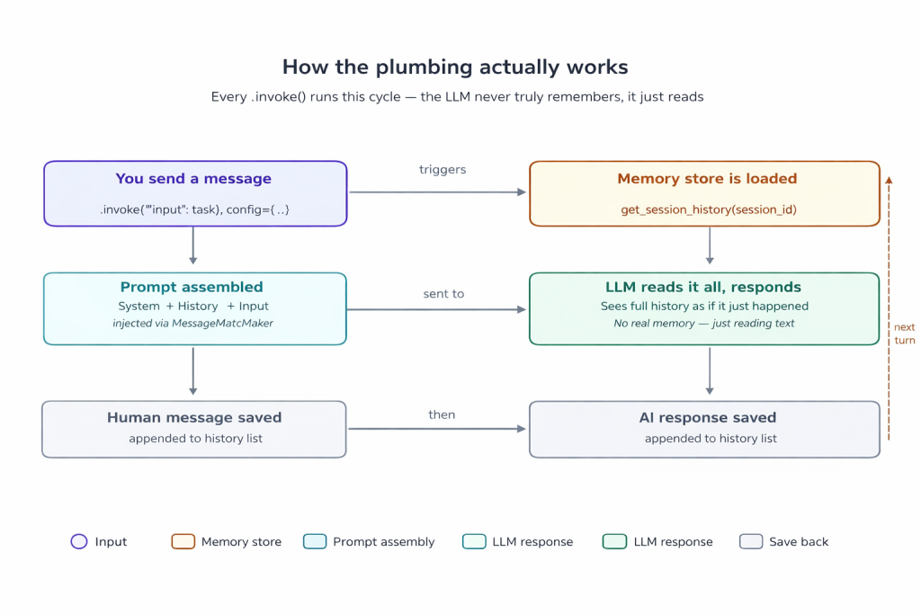
The memory cycle on every .invoke() call
That slot in the middle — where history gets injected into the prompt — is the MessagesPlaceholder in your LangChain prompt template. Every single LLM call, the full conversation history is dropped in there. The model reads it fresh, as if it just happened.
This is also why context window limits are not just a theoretical concern. Llama 3.1 supports around 128k tokens. A long conversation generates a lot of history. If you never trim or summarise it, you will eventually hit that ceiling, and older messages get quietly cut off. The semantic and summary memory types exist specifically because of this.
The string that has to match — and nobody warns you
MessagesPlaceholder(variable_name=”chat_history”) ← in your prompt
history_messages_key=”chat_history” ← in RunnableWithMessageHistory
The Code — Three Stages of Memory
Here is what the progression looks like in actual LangChain code. I am using Ollama because running models locally is free and I am not made of GPU budget.
Stage 1 — Short-term (what you probably have)
If you have followed any LangChain getting-started guide, this is likely where you are. It works within a session, and that is it.
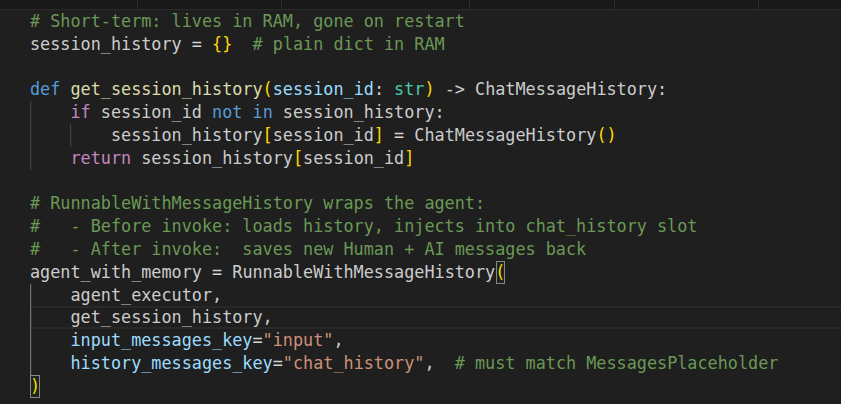
Short Term Memory
Stage 2 — Persistent (the upgrade I should have done week one)
One import. One changed function. Your agent now remembers across restarts.
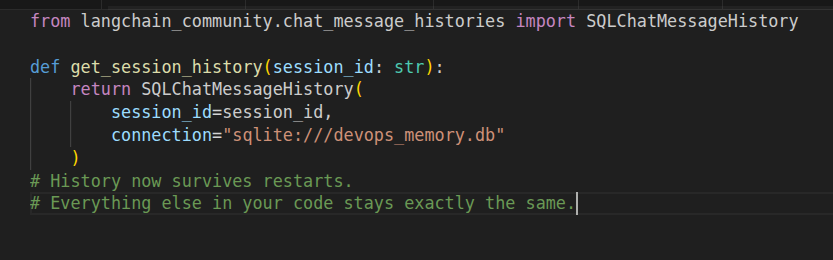
Long Term Memory
Stage 3 — Semantic retrieval (when history gets long)
After a few weeks of real usage, injecting the entire history into every prompt started causing problems. Prompts got long, responses got slower, context windows started straining. The fix: stop injecting everything, start retrieving only what is relevant.
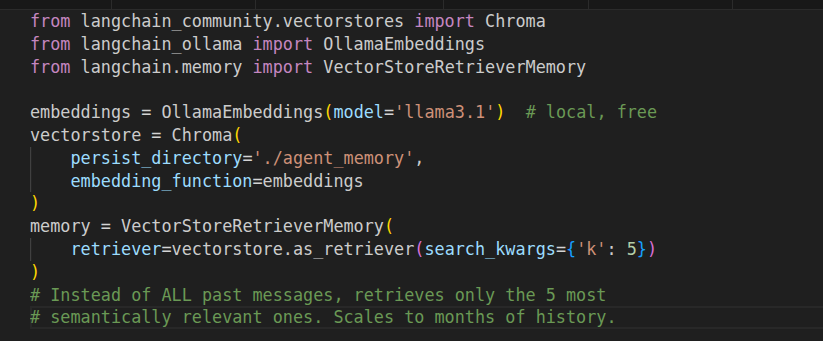
Semantic Memory
What This Looks Like in a Real Conversation
The demo that finally sold my team on memory was a simple three-turn conversation. No fancy setup, no long explanation — just this:
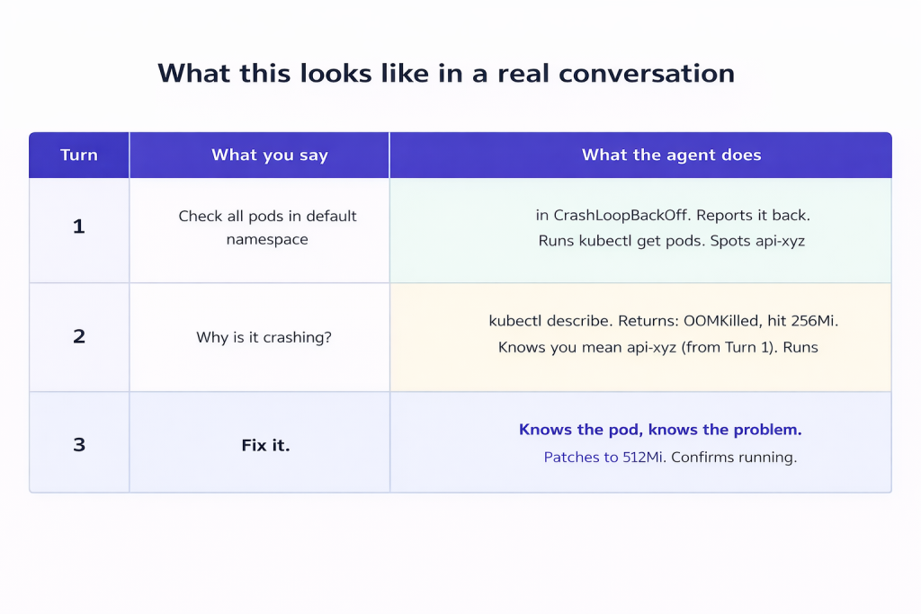
Three turns, no re-explaining
Turn 3 is two words. The agent patches the right pod with the right fix because it has read the full context from the previous two turns. No re-explaining, no re-specifying, no copy-pasting the pod name again.
Run that same conversation without memory and Turn 2 falls apart. The agent has no idea which pod you mean. You have to re-explain everything. The whole thing stops feeling like a conversation and starts feeling like filling out a form.
Which Memory Strategy Should You Actually Use
Honest answer: start simple and add complexity only when you feel the pain of not having it. Here is how I would sequence it:
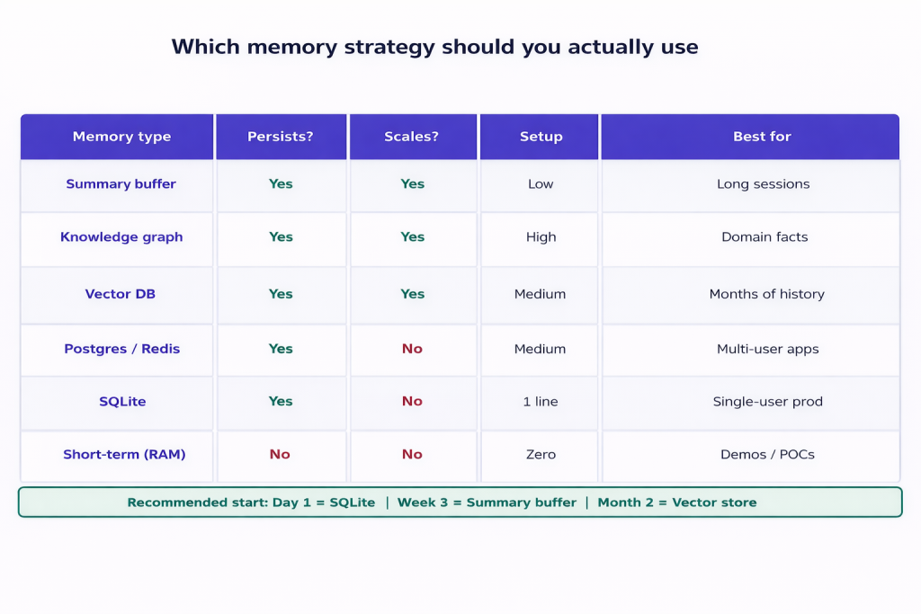
Memory strategy comparison
What I would do if starting over today
Day 1: SQLite. One line of code, zero thought required.
Week 3: ConversationSummaryBufferMemory when prompts get too long.
Month 2: Chroma vector store when you have real incident history to search.
What worked for us: start with SQLite, deal with context length when it actually becomes a problem, and only touch vector stores once you have real history worth searching. We skipped straight to Chroma on one project and spent a week setting it up before we had enough data to make it useful.
Where This Is All Going — My Honest Take
Right now, AI memory is mostly a clever workaround. We are taking models with no persistent state and faking continuity by stuffing history into prompts. It works, but it is a bit like duct-taping a notepad to someone’s forehead every time they walk into a meeting.
What worked for us: SQLite for persistence, summary buffer for context control, Chroma for semantic recall. Layer them in that order. Get the basics solid first.
The biggest shift in how the agent feels is not about which memory system you use. It is just about having any persistence at all. The jump from zero to SQLite is enormous. Everything after that is refinement.
One Change, Right Now
If your LangChain agent is using ChatMessageHistory() — and it probably is if you started from any tutorial — swap it out:
# Before
session_history[session_id] = ChatMessageHistory()
# After
SQLChatMessageHistory(session_id=session_id, connection=”sqlite:///memory.db”)
That is it. Ninety seconds of work. Your agent wakes up tomorrow knowing what happened today.
I genuinely wish someone had told me to do this on day one. Would have saved a fair amount of frustration and one particularly embarrassing demo.