
Exploring Agentic AI for Automation
The other day, my client asked for something that sounded simple at first – he wanted an alert in his inbox whenever the date changed on a specific website.
And, of course, the first thought that came to my mind was: “Yes, that’s doable with Python!”
Because that’s what I have always done in my analytics journey – write code to automate stuff.
So I rolled up my sleeves and started working on it. The plan was straightforward: check if the website had any security or login requirements, scrape the latest date, compare it with the previous one, and email myself if it changed.
Since I couldn’t expose my Gmail password, I had to create an OAuth token for sending the alert email securely – a small but necessary step. And yes, after a few tweaks, the code worked perfectly.
import os
import json
import smtplib
import re
import cloudscraper
import re
from bs4 import BeautifulSoup
from datetime import datetime
from email.mime.text import MIMEText
from selenium import webdriver
from selenium.webdriver.chrome.service import Service
from selenium.webdriver.common.by import By
from selenium.webdriver.support.ui import WebDriverWait
from selenium.webdriver.support import expected_conditions as EC
from webdriver_manager.chrome import ChromeDriverManager

# Configurations
URL = "https://echa.europa.eu/news-and-events/news-alerts/archive-2025"
STATE_FILE = "echa_news_state.json"
EMAIL_FROM = "xxx@tothenew.com"
EMAIL_TO = "xxx@tothenew.com"
EMAIL_PASS = “ccccc"
SMTP_SERVER = "smtp.gmail.com"
SMTP_PORT = 587

def get_latest_news_date():
    url = "https://echa.europa.eu/news-and-events/news-alerts/archive-2025"
    scraper = cloudscraper.create_scraper()
    response = scraper.get(url)
    response.raise_for_status()
    soup = BeautifulSoup(response.text, "html.parser")
    date_pattern = re.compile(r"\b\d{1,2}\s+\w+\s+2025\b")
    match = date_pattern.search(soup.get_text(" ", strip=True))
    if match:
        return match.group()
    else:
        return None

def load_previous_state():
    if os.path.exists(STATE_FILE):
        with open(STATE_FILE, "r") as f:
            return json.load(f)
    return {}

def save_state(state):
    with open(STATE_FILE, "w") as f:
        json.dump(state, f)

def send_email(latest_date, previous_date):
    subject = "📢 ECHA News Alert Updated"
    body = f"""
Latest news date from ECHA Archive 2025: {latest_date}
Previous recorded: {previous_date or 'None'}
URL: {URL}
"""
    msg = MIMEText(body, "plain")
    msg["From"] = EMAIL_FROM
    msg["To"] = EMAIL_TO
    msg["Subject"] = subject

    with smtplib.SMTP(SMTP_SERVER, SMTP_PORT) as server:
        server.starttls()
        server.login(EMAIL_FROM, EMAIL_PASS)
        server.send_message(msg)

def main():
    latest_date = get_latest_news_date()
    if not latest_date:
        print("⚠️ Could not find a date on the page.")
        return

    state = load_previous_state()
    previous_date = state.get("latest_news_date")

    if latest_date != previous_date:
        send_email(latest_date, previous_date)
        state["latest_news_date"] = latest_date
        save_state(state)
        print(f"✅ Email sent. New date: {latest_date}")
    else:
        print(f"No change. Latest date still: {latest_date}")

if __name__ == "__main__":
    main()
Then came the challenge: automation.
I explored multiple approaches – Windows Task Scheduler, Cron Jobs, even a few GitHub scripts. I ended up using Task Scheduler because I didn’t have access to a cloud platform. The setup worked, but there was a catch – my system had to be on at the scheduled time.
Still, I was happy. I thought, “At least it works!”
I demoed it to my client, and he smiled – and then rejected the idea.
Not because it didn’t work, but because the intended end-user wasn’t technical. The client wanted someone with zero coding knowledge to handle this task.
Then came the real turning point.
He asked me, “Have you explored Agentic AI?”
My first thought was, “Come on, we can’t do this using ChatGPT – how would we even schedule it?”
But curiosity got the better of me, and that’s when my two-week coding project turned into a two-day discovery of what’s possible today.
What is Agentic AI, really?
Agentic AI refers to AI systems that can take autonomous actions to achieve goals, not just answer questions.
Unlike traditional AI chatbots that stop at providing text responses, agentic systems can plan, reason, execute, and monitor workflows – almost like a digital assistant that doesn’t just tell you what to do but actually does it.
Think of them as a bridge between LLMs (like GPT-4/5) and automation tools – they combine reasoning with execution. They can log into websites, extract information, perform checks, send alerts, or even trigger workflows without you having to write a line of code.
In my case, instead of coding a scraper, an AI agent could watch a web page for me and email me when something changes. That’s exactly what I found in Browse.ai.
My hands-on with Browse.ai
At first, I was skeptical – “there’s no way this thing will actually detect a date change and send an email automatically.”
But once I started exploring, the simplicity was shocking.
All I did was:
- Go to Browse.ai
- Select the action you want to perform like Monitor Site Changes or Extract Structured Data from a website
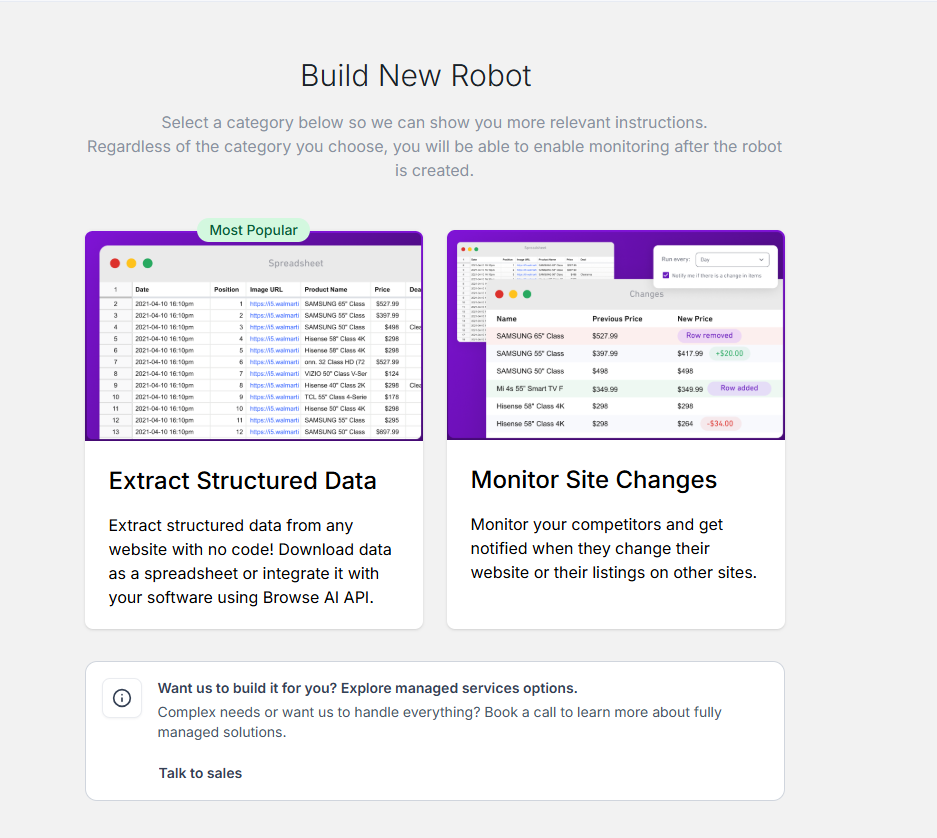
nn
3. Select Monitor Site Changes and paste the website link (which requires monitoring),
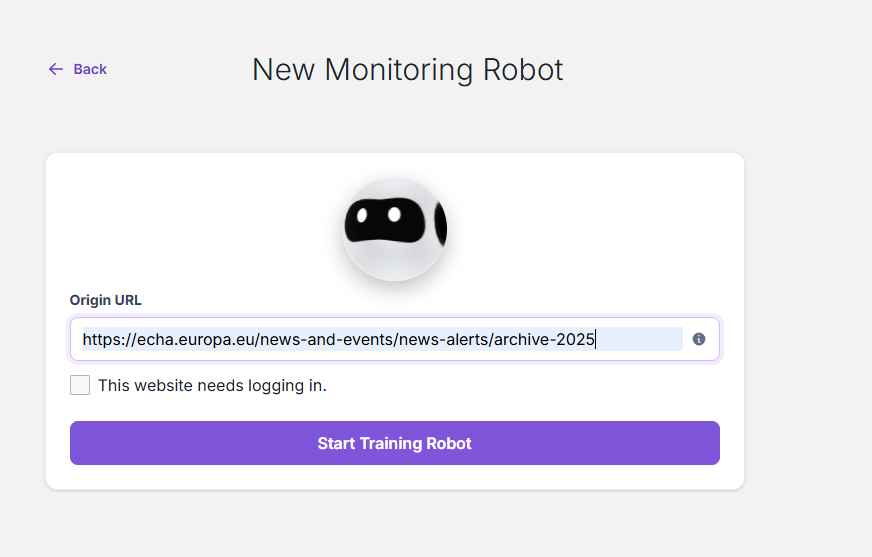
image
4. Now once the web page uploads on screen, select either Text or capture screenshot to train the model
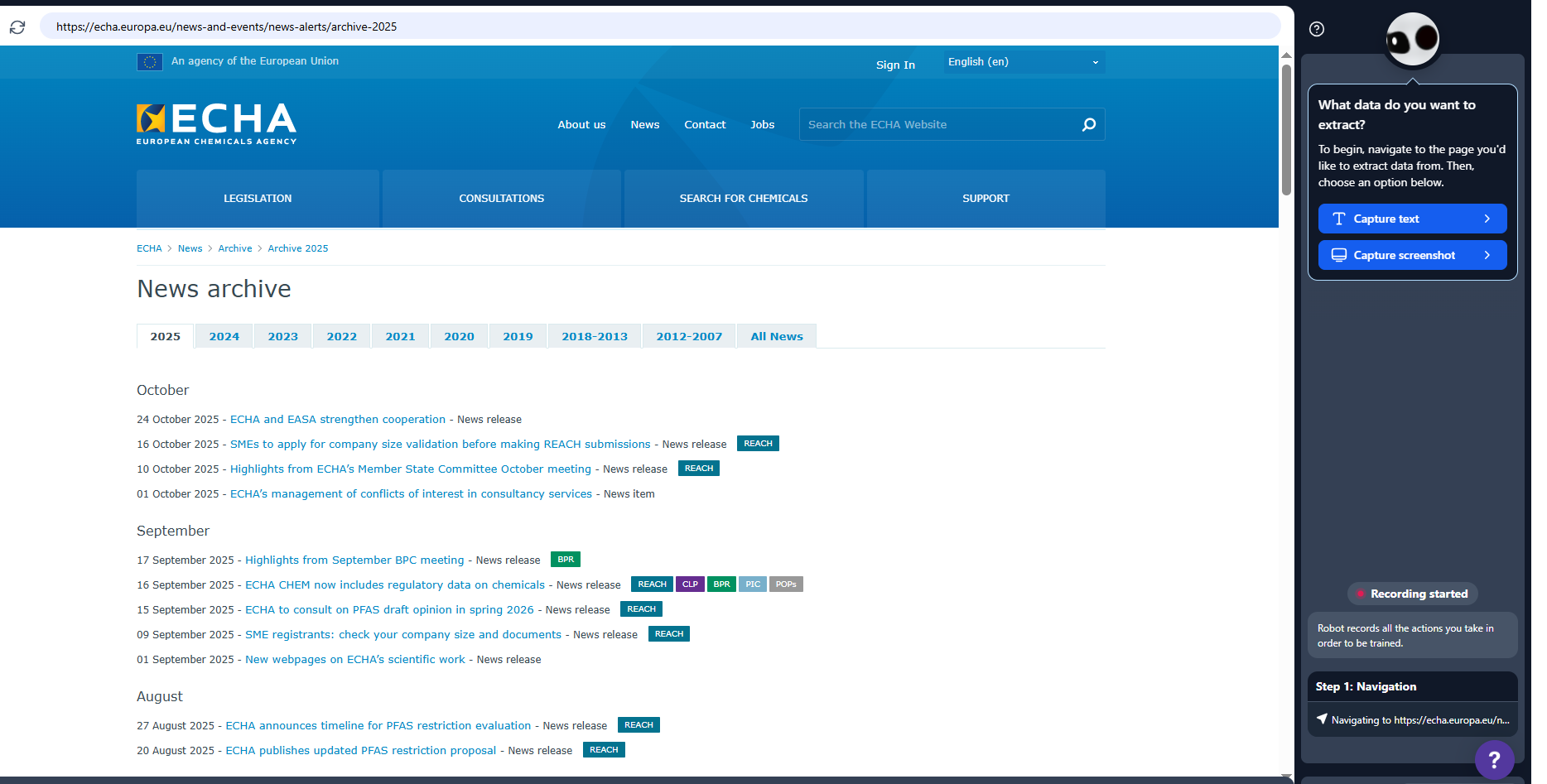
image
5.Now Highlight the text (in my case date and List name)
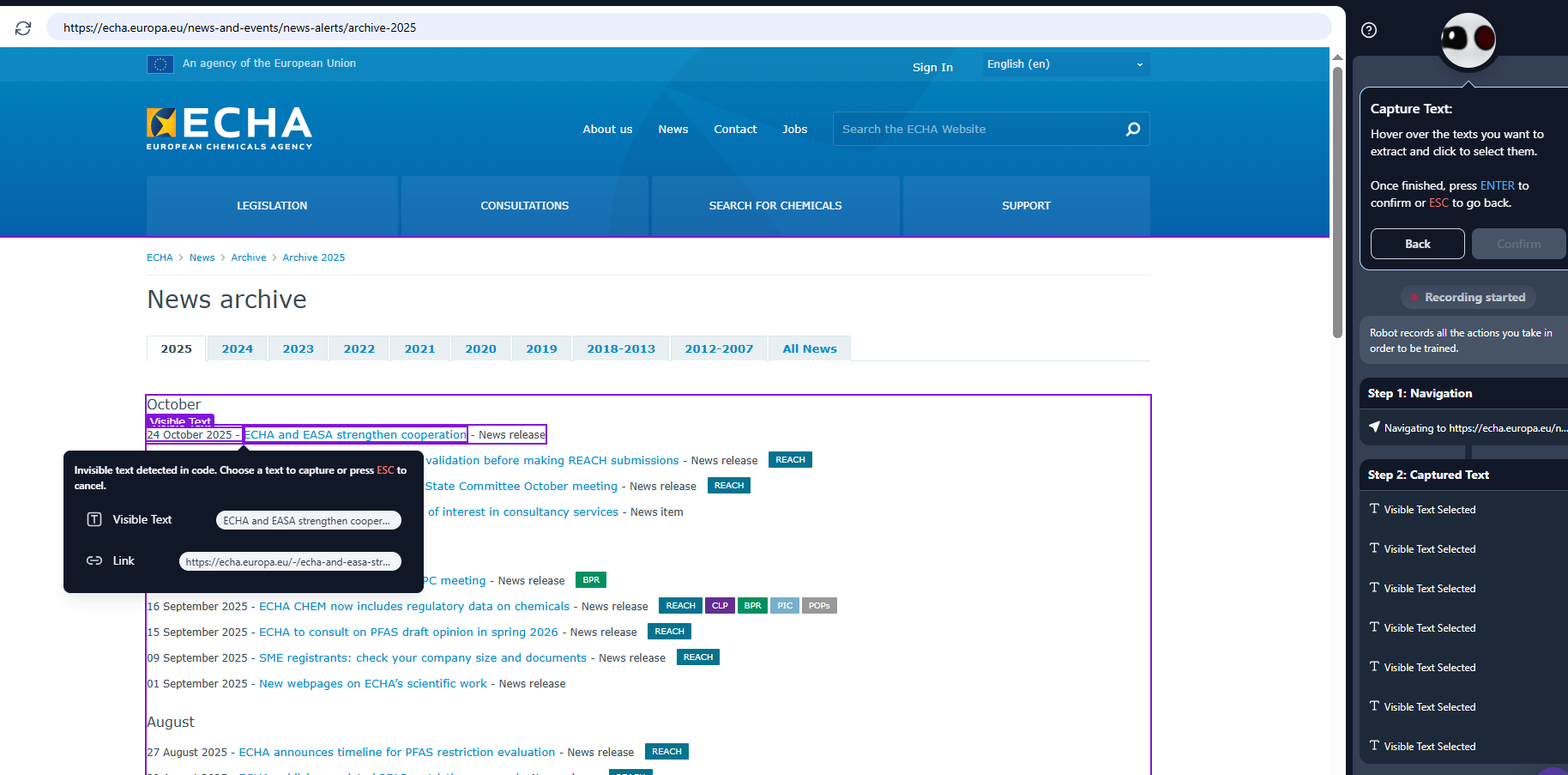
image
6.Now Name your Robot
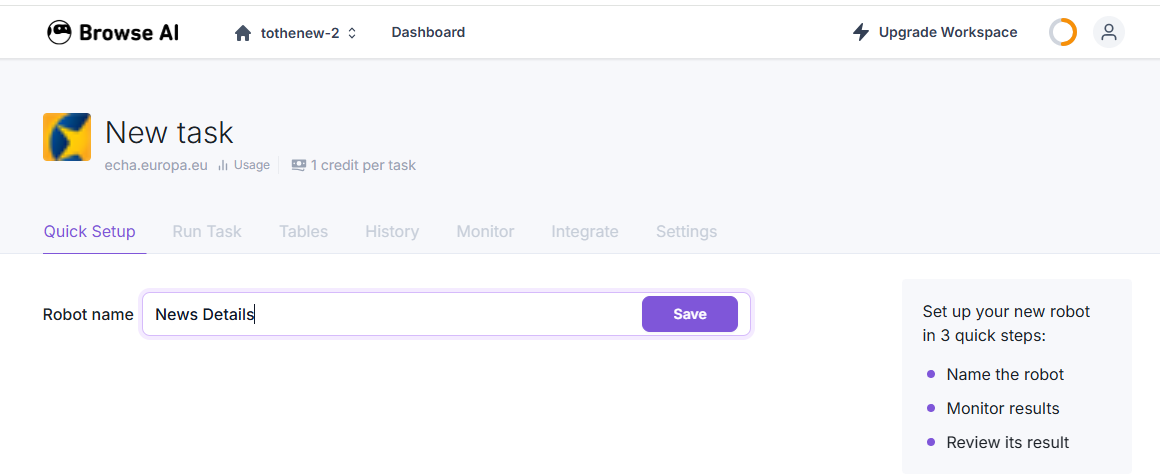
image
7.Set a daily/weekly or monthly schedule,
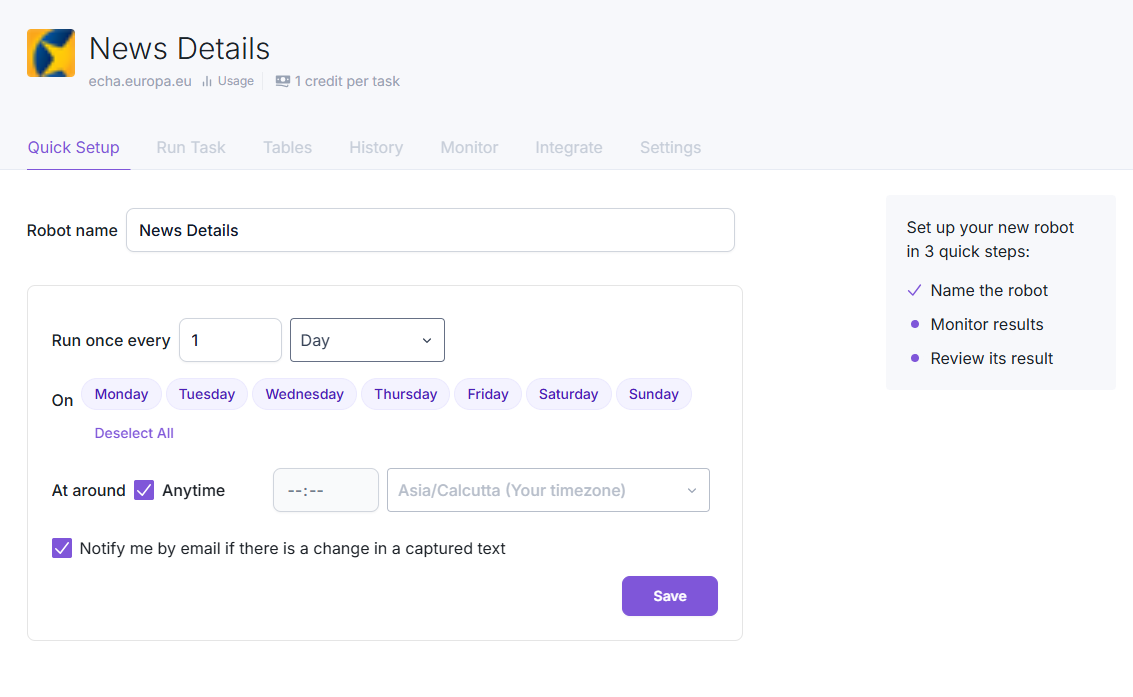
image
8.And choose email notification.
Also, we can view all Trained Robots at home page for easy navigation
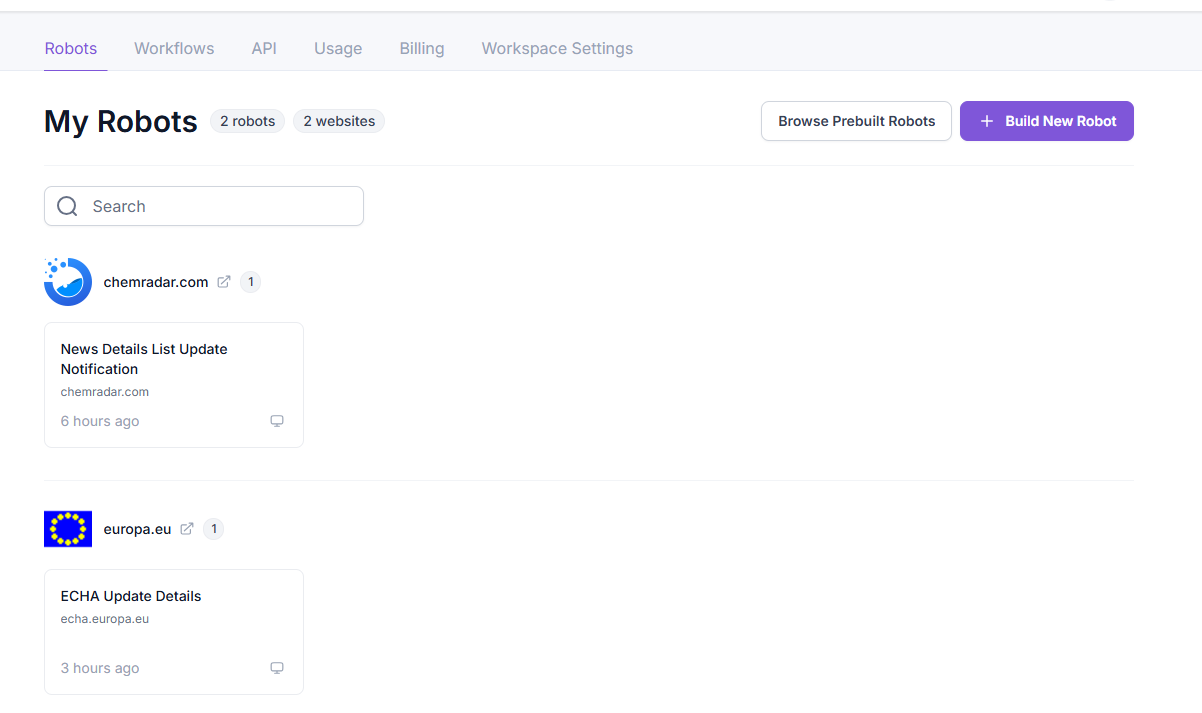
image
That’s it – no scripts, no tokens, no schedulers, nothing.
And then, a few days later, I got an email from Browse.ai: “Change detected on the monitored page.”
How the actual Output Looks like:
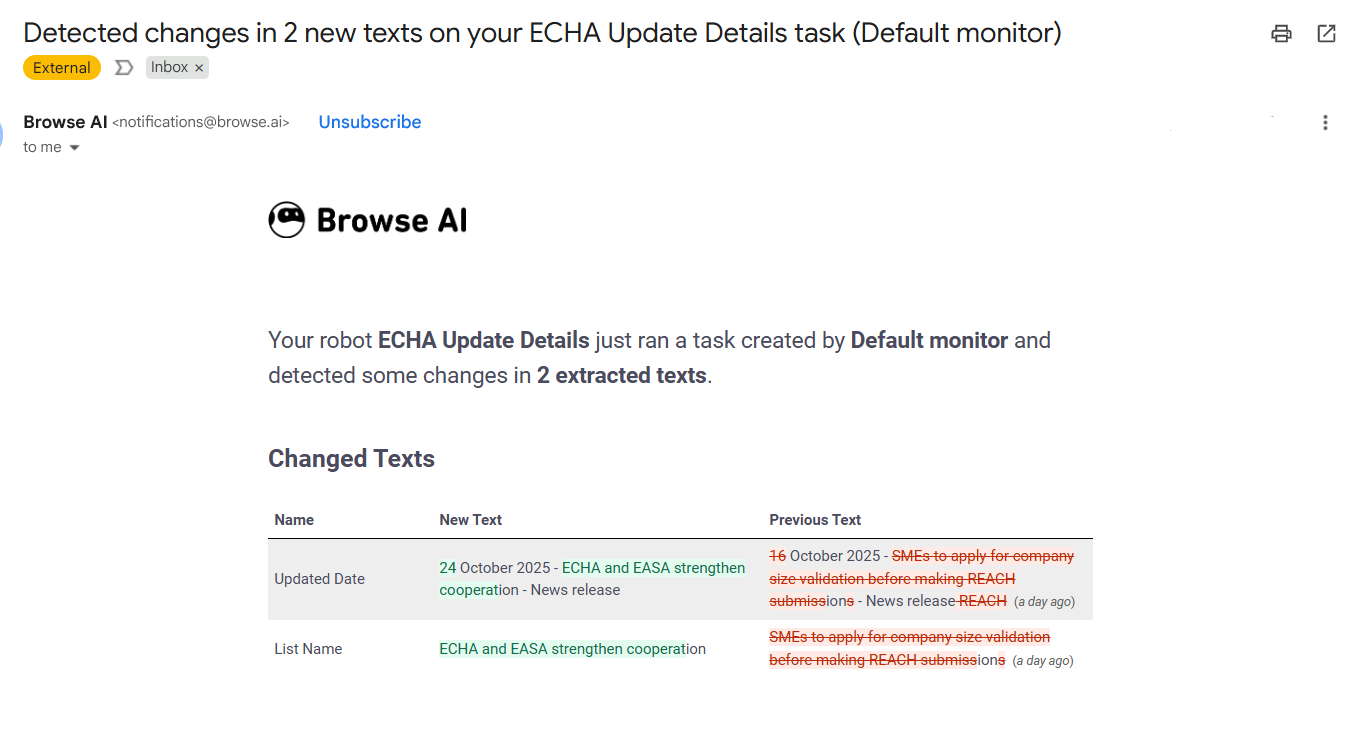
Final Output
That was my “wow” moment. What took me days to code, schedule, and secure could be done in less than 15 minutes.
About Browse.ai (Free vs Paid)
Browse.ai works on a credit (token) system.
When you sign up, you get 50 free tokens, enough for testing 50 tasks (like 50 page runs or extractions).
Each run or monitoring cycle consumes a few tokens depending on what you’re doing (a simple date extraction uses 1 token).
You can schedule robots to run daily, weekly, or hourly – the frequency and number of monitored pages determine how fast you use your tokens.
Free Plan:
1. 50 free credits (tokens)
2. Basic data extraction
3. 1 monitoring robot
4. Manual and daily scheduling
Paid Plans (as of now):
1. Start from around $39/month
2. Include 2,000+ credits
3. Allow multiple robots, advanced scheduling, webhooks, and API access (so you can connect with Slack, Zapier, or Gmail).
For most business cases, the free version is enough to test the workflow or set up a single monitor. Once you scale or need multiple pages tracked, you can move to the paid plan.
What I learned
Exploring Browse.ai and understanding Agentic AI made me realize how automation is evolving. It’s not just about writing scripts anymore, it’s about letting AI act for you.
Agentic systems like Browse.ai, Zapier’s AI agents, or even OpenAI’s upcoming “Projects and Actions” features represent a shift from prompting AI to delegating work to AI.
So yes, the two weeks I spent coding were not wasted, they helped me appreciate the simplicity of these tools even more.
And now, if you ask me to set up a page-change alert for a non-technical client, I know exactly what to recommend.

