


Over the past year, I’ve been exploring how AI can assist in test automation. After working with various LLM-powered assistants and code-generation tools, I recently built a complete Selenium framework using the Model Context Protocol (MCP). In this post, I’ll share my technical insights, what worked, and what challenges I faced.
Context: Where AI-Assisted Testing Fits
Most content on “AI + Testing” tends to be either oversimplified demos or theoretical discussions. In real-world codebases, the situation is different.
In my experience, most AI assistants are great at generating isolated code snippets but struggle with maintaining architectural consistency across an entire framework.
Page Object Model (POM) frameworks, in particular, require:
- Consistent patterns across multiple classes
- Proper abstraction layers
- Configuration management
- Integration between components
This is exactly the type of work where AI can either shine or fail.
Why MCP Selenium, Not Just Generic LLM Prompting
Let’s clarify the distinction:
Standard LLM Assistants (ChatGPT, Copilot, etc.):
- Generate code based on training data
- Have no execution context
- Lack of verification loops
- Require manual integration
MCP (Model Context Protocol):
- Provides a standardized interface between LLMs and external tools
- Allows actual execution and verification
- Maintains state across conversations
- Supports bidirectional communication with Selenium WebDriver
Angie Jones’ MCP Selenium implementation enables LLMs to interact with browser automation as a first-class tool, not just suggest code. In practice, the AI can execute actions, observe results, and iterate—similar to working in a REPL, but using natural language.
The Implementation: Technical Approach
Rather than diving in blindly, I approached this systematically, evaluating where MCP adds value and where traditional methods are still better.
Before diving into the phases, here’s a high-level view of the MCP Selenium framework and how AI interacts with Selenium WebDriver to execute tests:
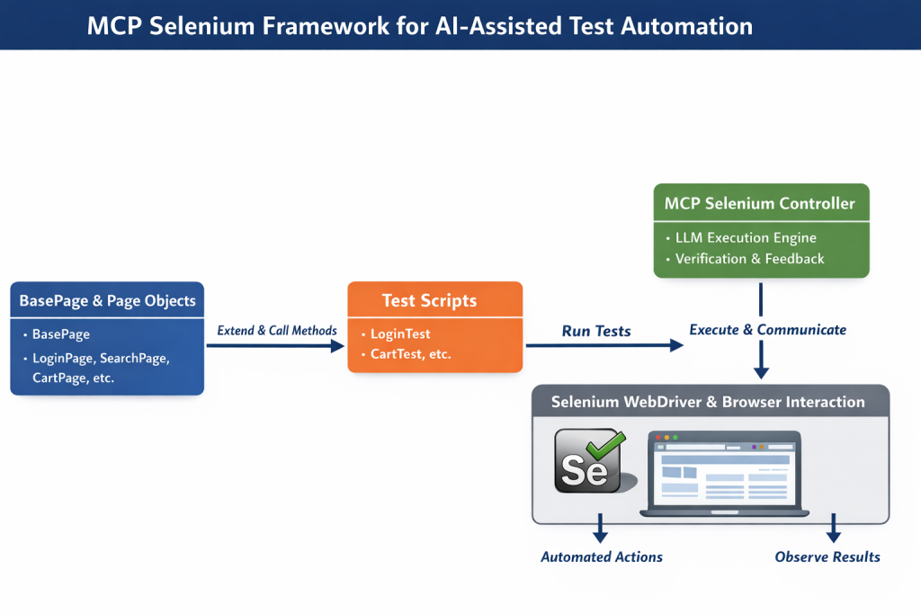
MPC Selenium Framework for AI-Assisted Test Automation
The diagram shows the flow from BasePage classes, through Page Objects and Test Scripts, to the MCP Selenium Controller, which executes and verifies actions via WebDriver. It helps visualize context preservation and iterative refinement in practice.
Phase 1: Architecture Foundation
I started with a structured prompt:
"Generate a Maven-based Selenium framework with TestNG. Dependencies: Selenium 4.15.0, WebDriverManager 5.6.2, ExtentReports 5.1.1, Log4j 2.22.0. Include compiler plugin for Java 11 and surefire for TestNG parallel execution."
Result: A proper pom.xml with correct plugin configurations and dependency management. This saved me from tedious Maven setup and allowed me to focus on framework design.
Phase 2: Base Abstraction Layer
Prompted the AI to:
"Create BasePage with explicit wait strategies, screenshot capture with timestamps, element interaction methods with retry logic, and iframe handling."
Outcome: High-quality boilerplate. The code used proper WebDriverWait, ExpectedConditions, exception handling, and logging.
My enhancements:
- Externalized timeout configurations
- Added custom wait conditions for specific cases
- Improved screenshot naming and error messages
The AI handled the heavy lifting, letting me focus on domain-specific improvements.
Phase 3: Page Objects and Test Layer
This is where most AI approaches struggle. Maintaining consistency across multiple interconnected classes is challenging.
I used a structured prompt:
"Create [specific test scenario] with Page Object Model. Pages should extend BasePage, use proper locator strategies, implement specific methods: [list methods]. Test should include setup, execution, assertions, and cleanup."
Observation: The AI maintained architectural consistency across 11 page objects, including:
- GoogleHomePage / GoogleSearchResultsPage (standard locator patterns)
- SauceDemoLoginPage / ProductsPage / CartPage (stateful page transitions)
- JQueryDraggablePage (complex iframe + Actions API)
No copy-pasting was required, and all pages followed the same architectural pattern.
Phase 4: Test Configuration and Execution
Generated TestNG XML configurations for:
- Parallel test execution (thread-count optimization)
- Suite-level grouping (smoke, regression)
- Test dependencies and ordering
- Browser parameter passing
Enhancements I added: Custom listeners, retry logic, and reporting integrations. The suite was immediately usable.
Practical Performance Analysis
Traditional framework development (based on my last 3 projects):
- Maven setup: 1–2 hours
- BasePage + BaseTest: 2–3 hours
- 11 Page Objects: 8–12 hours
- 19 test methods: 8–10 hours
- TestNG configuration: 1–2 hours
- Documentation: 3–4 hours
Total: 23–33 hours of actual coding.
With MCP Selenium:
- Initial generation: 1–2 hours
- Review & refinement: 2–3 hours
- Custom enhancements: 1–2 hours
- Documentation review: 30 minutes
Total: 4.5–7.5 hours
Productivity multiplier: 3–7x, depending on complexity, domain, and individual usage patterns.
Boilerplate generation was 10–20 times faster, while complex business logic and edge cases were ~2 times faster.
Technical Challenges and Limitations
Prompt Engineering Still Matters: Vague prompts generate vague code. Being explicit about locators, method signatures, and test scenarios yields dramatic improvements in results.
Complex Waits and Timing: Generic waits often require manual tuning for dynamic SPAs.
Test Data Management: AI can generate structure, but data strategy and parameterization still need human decisions.
Edge Cases and Error Scenarios: Happy-path tests are straightforward. Negative testing and boundary conditions require explicit instructions or manual coding.
What I Built
Repository: github.com/ttnmahesh/selenium-mcp-with-cursor
- 28 source files (~4,800 lines)
- 11 Page Object classes
- 6 test suites (search automation, forms, e-commerce flows, drag-and-drop, multi-page journeys, responsive testing)
- 19 test methods with assertions
- 3 TestNG suites
- Maven build with parallel execution
- Extensible reporting (TestNG + ExtentReports)
- CI/CD ready (Docker-compatible)
Highlights: Proper abstraction, configuration externalization, screenshot capture, cross-browser support, production-ready code.
Integration Patterns That Worked
Iterative Refinement: Build incrementally (Base classes → single page → multiple pages → advanced features).
Context Preservation: MCP maintains conversation state; edits can reference existing code without re-explaining.
Documentation as Code: Generate docs alongside implementation to keep everything in sync.
Configuration over Hardcoding: Externalize URLs, timeouts, and credentials.
Comparison with Other AI Tools
| Tool | Strength | Weakness | Use Case |
|---|---|---|---|
| GitHub Copilot | Inline suggestions | No execution context | Method-level code completion |
| ChatGPT / Claude (standalone) | Complex reasoning, detailed explanations | Manual copy-paste, no codebase integration | Architecture discussions, isolated problem-solving |
| MCP Selenium | Execution verification, maintains context, and architectural consistency | Requires specific IDE integration (Cursor, Claude Desktop) | End-to-end framework generation with iteration |
Best approach: Combine them. Use Copilot for in-line coding, MCP for framework scaffolding, standalone LLMs for design discussions.
Implementation Guide for Teams
Setup (5 minutes): Configure the MCP server in Cursor or Claude Desktop.
Proof of Concept (1 hour): Start with a single, simple test to validate workflow.
Scale Gradually: Introduce MCP for new scenarios, framework enhancements, and documentation updates.
Review Standards: Generated code still requires review: locator strategies, waits, error handling, test independence.
Future Directions
API + UI Test Integration: Combine REST Assured with Selenium in the same framework.
Visual Regression Testing: Use AI to manage baseline screenshots.
Performance Tests: Generate JMeter plans alongside Selenium tests.
Dynamic Test Generation: Create test cases from application behavior analysis.
Conclusion: Practical AI Integration
AI doesn’t replace engineering expertise; it amplifies it. Quality output depends on clear prompts and human refinement. MCP Selenium reduces repetitive, boilerplate work, allowing engineers to focus on strategy, edge cases, and domain-specific challenges.
For engineers: It’s a productivity tool, not a replacement.
For teams: Worth exploring for framework development.
For the industry: Early adoption positions you well for the future of AI-assisted testing.
Repository: github.com/ttnmahesh/selenium-mcp-with-cursor
MCP Selenium: github.com/angiejones/mcp-selenium