Storing SNS Messages in S3 using Kinesis Data Firehose – step by step implementation with Real-World Use Cases
Introduction
We know that many applications generate large amounts of event data such as alerts, application events, logs, and notifications. This data is usually unstructured and arrives in a continuous manner.
The initial step in creating a data engineering pipeline is to store this event data into a reliable and long term storage system in order to be processed, analyzed, and it can be used to generate insights.
A common approach in AWS is:
Amazon SNS (Messages¬ification) —> Kinesis Data Firehose (streaming data processing) —> Amazon S3 (data storage)
In this architecture:
- Firstly the applications send events to Amazon SNS.
- Amazon Kinesis Data Firehose receives these events from SNS.
- Firehose then automatically delivers the event/data to Amazon S3 where this data is stored for long-term storage. Once the data is stored in S3, you can use various AWS services to process, analyze, or transform the data.
- These services include : AWS Glue, Amazon Athena, Amazon Redshift
The services which are involved are :
Amazon SNS
Amazon Simple Notification Service (SNS) is a fully managed messaging service that follows the publish/subscribe (pub/sub) model.
In SNS, publishers send messages to a topic, and subscribers receive those messages.
SNS can send messages to variuos endpoints such as: Email, AWS Lambda, SQS, Kinesis Data Firehose. It is mostly used for system notifications, application alerts, communication of micro services, SNS supports real time message delivery.
Kinesis Data Firehose
Amazon Kinesis Data Firehose Amazon Kinesis Data Firehose is a fully managed service that provide the easiest way to capture, transform, and load data streams into AWS, and supports the streaming of real-time data into destinations such as- AWS S3, Amazon OpenSearch, Amazon Redshift. One of the main advantages of AWS Firehose is that no infrastructure management is required and it provide automatic scaling it also supports automatic retry. Firehose is widely used for storing event data and streaming logs.
Architecture Overview
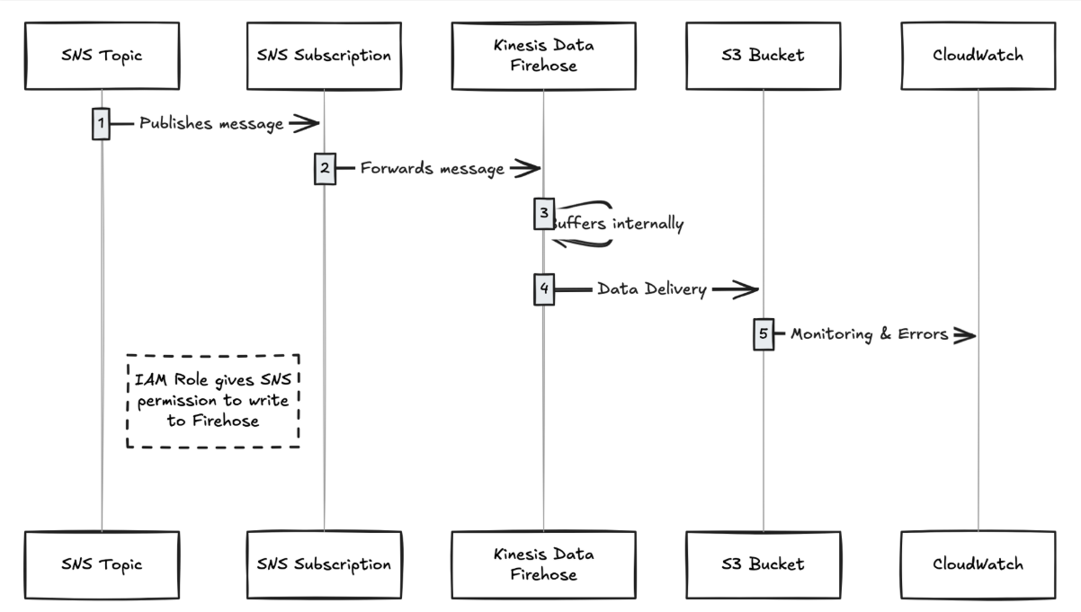
The architecture of this pipeline is simple:
Application / Service —> SNS Topic —> Kinesis Data Firehose —> S3 —> Data Processing (Glue / Athena / Redshift)
Flow explanation:
- Application sends events to SNS Topic
- SNS delivers these events to Kinesis Firehose
- Firehose collects the data and writes data into S3
- Data can be analyzed later using analytics tools
Real-World Use Cases
1. Application Event Logging
Many applications generate important events such as – login of user, payment information, Order placed, API request logs.
These event can be sent to SNS and kept in S3 using AWS Firehose.
Benefits:
- It provides centralized storage i.e all events are kept in one place.
- It also helps in troubleshooting and debugging
- Data can be stored for a long period for time and can be used for analysis.
Example:
E-commerce App —> SNS —> Firehose —> S3
2. Security and Audit Logging
Security teams store logs for compliance and to perform audits.
There are many events such as access denied, login failures, suspicious activity. These events can be sent to SNS and stored in S3
Benefits
It helps in storing of logs for a long period of time.
- Data cannot be easily changed (immutable storage)
- It provide immutable storage it means data cannot be changed easily
- Useful for security investigations
3. Monitoring and Alert Archival
Monitoring tools generate alerts for issue such as High CPU/Memory utilization, service down alerts, failure of API.
These alerts can be sent to SNS, then Amazon Kinesis Data Firehose stores these alerts to Amazon S3.
The data which is stored in S3 helps to keep a history of monitoring data and then this data can be used for analysis, tracking SLA performance and review of incidents.
Implementation
Steps to Create DataFirehose with S3 destination-
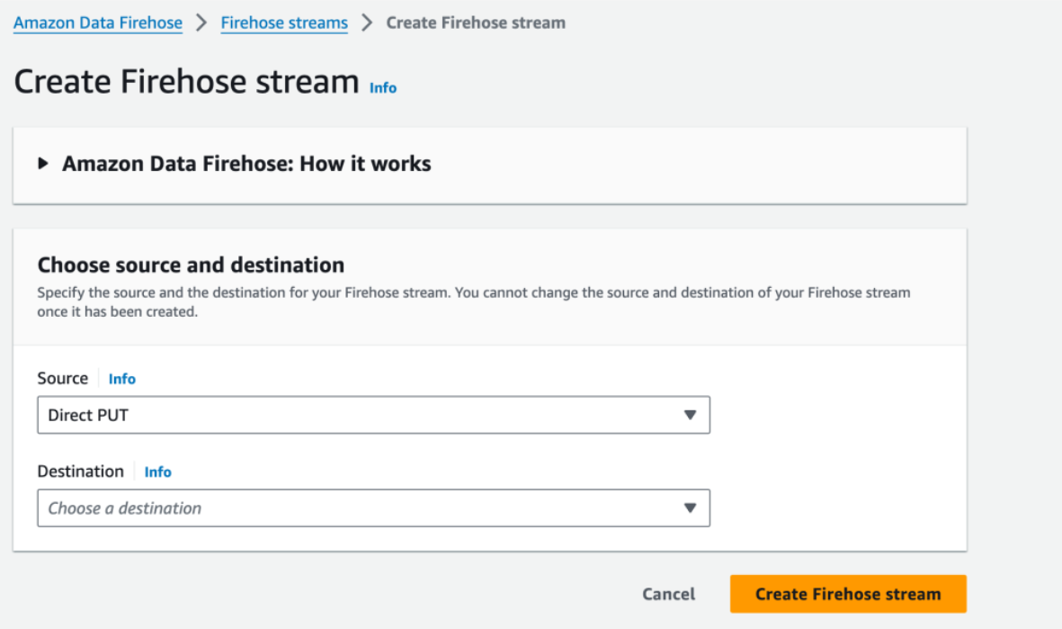
Step1: Firstly go to Amazon Data Firehose and then click on Create Firehose Stream, then select Direct Put as a Source and S3 as destination.
Step2: Now go to destination settings.
Enter the S3 bucket details, you can switch on Dynamic partioning based on conditions,
Kinesis Data Firehose stores by default events into S3 using this default structure: yyyy/mm/dd prefix
Example – s3://bucket-name/2026/02/17/
In Error Output Prefix, you can define an error folder. If any message fails to process, it will be stored in this error folder
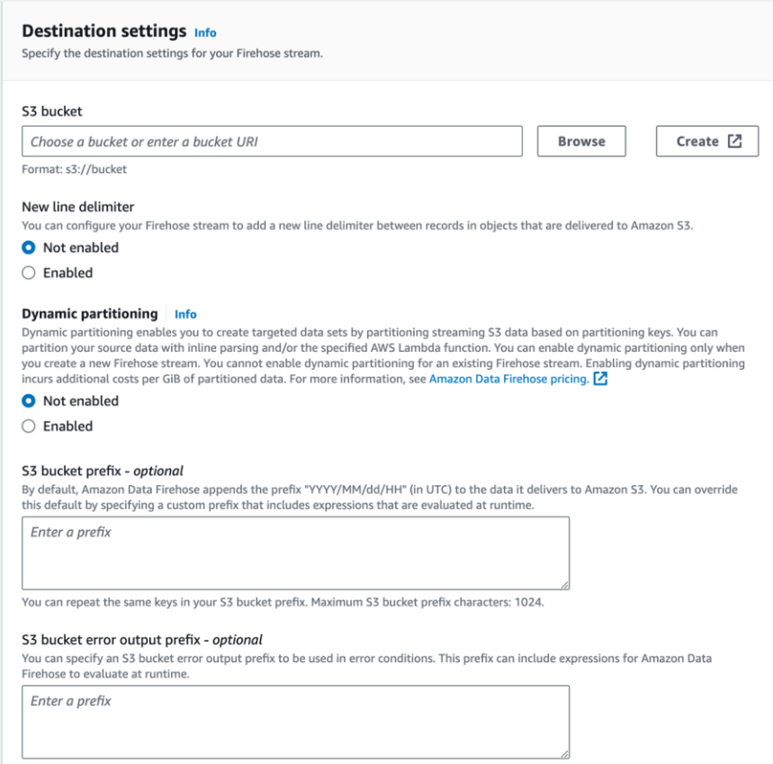
You can also enable encryption and choose the file format etc on the same page with the advanced settings.
After customizing the configuration, click on Create Firehose stream and enter a name of the stream.
Firehose setup is ready. Now the next step is to integrate this Firehose stream with SNS.
Step 3: Creating an IAM role that will allow SNS write to Firehose
To integrate SNS with Firehose, a permission role will be required firstly – For this create an IAM role with the policy AmazonKinesisFirehoseFullAccess or you can also create a custom policy
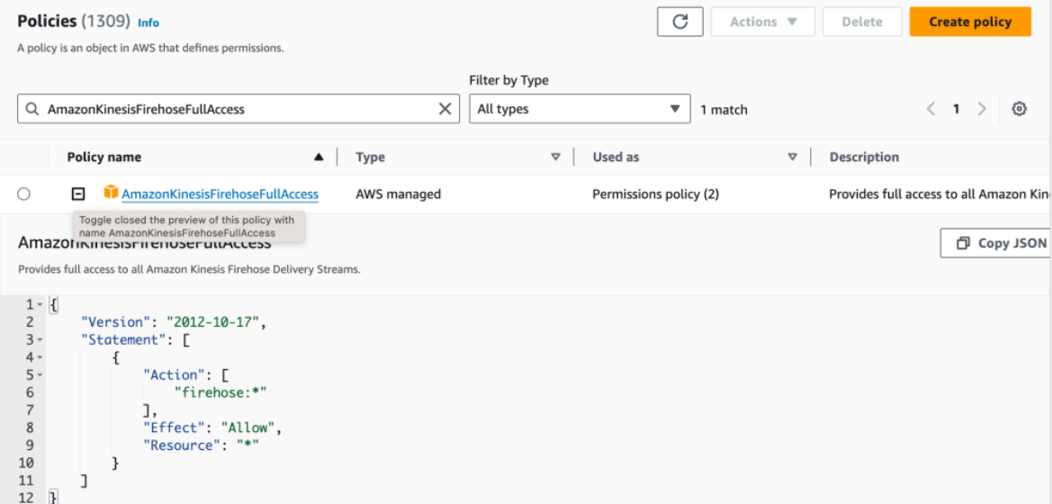
Go to IAM roles and cick on create role. If you want to use a prebuilt policy add the “AmazonKinesisFirehoseFullAccess” policy to a new role:
you can also create a new policy / inline policy.
Once the role is created with the policy, copy the Role ARN.
Step 4: Connect DataFirehose to SNS
Goto SNS and selec the topic that you want to use
Click on create subscription
Select Kinesis Firehose protocol from the drop down list.
Enter the Firehose ARN in the Endpoint field
In the Subscription Role ARN, Enter the IAM Role that we have created earlier
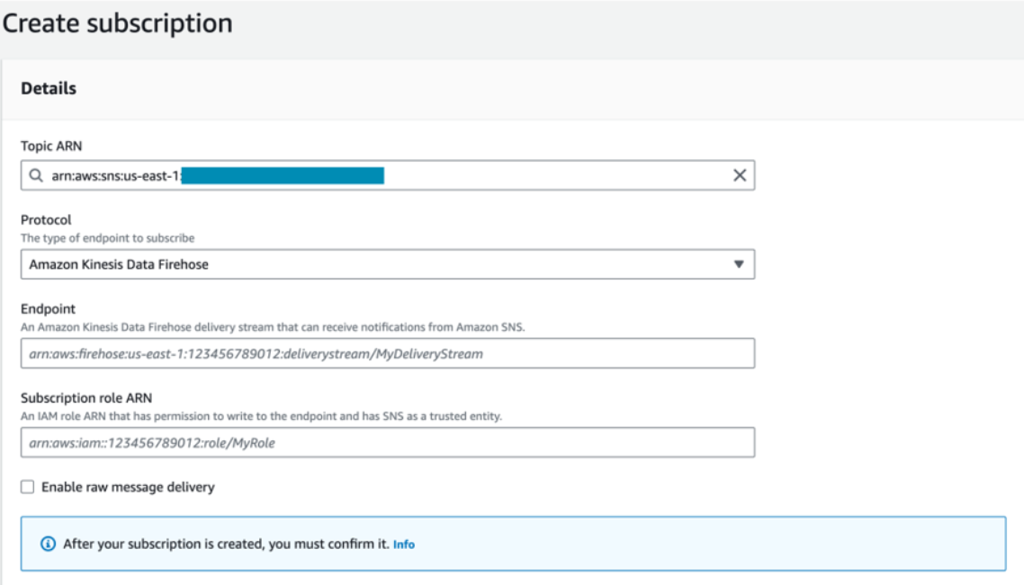
Now click on create Subscription, SNS is now connected to Firehose.
Conclusion
In this blog we explored how to build an event pipeline that stores messages from SNS into Amazon S3 by using Amazon Kinesis Data Firehose.
By this setup many organizations can collect and store large amount of event data in a reliable, scalable way. Once the data is stored in S3, it can be used for various tasks such as analytics, monitoring, compliance, and generating insights.
By using SNS, Firehose, and S3, organizations can create a simple event-driven data pipeline that requires less operational management and ensure efficient data collection and storage.