The Future of Java Development with GenAI
Introduction
A few months back, while debugging a messy Spring Boot service at 2 a.m., I pasted a confusing error trace into a GenAI tool just to see what it would say. To my surprise, it suggested a fix that actually worked. That was the moment I realized—this technology isn’t just hype; it’s going to change how we code.
Java, for decades, has been the language behind banking apps, insurance portals, and enterprise systems we all rely on. It’s rock solid, but also… a bit verbose and sometimes painfully slow to work with. Enter Generative AI (GenAI)—tools that don’t just autocomplete code, but actively help developers design, debug, and even explain their own projects.
In this blog, I’ll walk through what GenAI really means for Java developers like me and you, why it matters, some lessons I’ve learned while testing it in real projects, and where I think this is all heading.
What is GenAI in Java Development?
At a simple level, GenAI is like a junior teammate who can:
- Draft boilerplate code
- Suggest refactors
- Generate test cases
- Translate requirements into initial snippets
The difference from old-school IntelliJ autocompletes is that GenAI doesn’t just finish your thought—it tries to understand context and create new code from scratch.
In my project, I asked it to generate a DTO and a mapping function for an insurance product flow. Usually, that would take me about 25–30 minutes. GenAI spat it out in less than a minute. Did I have to tweak it? Of course. But still—time saved.
Why It Matters
1.Cutting Down Boilerplate
Java is powerful but let’s be honest, sometimes it feels like you’re typing the same thing again and again. With GenAI:
- DTOs, POJOs, even entire service classes can be drafted instantly
- Repetitive getters/setters don’t eat up hours anymore
For example, when building a Spring Boot API layer, I used AI to generate my controllers and basic response objects. I still added annotations and validation manually, but it cut dev time by nearly 30%.
2.Debugging with Less Pain
If you’ve ever stared at a stack trace that looks longer than your grocery list, you know the struggle. AI makes it easier by:
- Explaining error logs in plain English
- Suggesting common fixes based on known patterns
When I shared a tricky Hibernate error, it even suggested which configuration I might’ve overlooked. That saved me half a day of Googling.
3.Faster Onboarding
New joiners often drown in large codebases. With GenAI, they can literally ask, “What does this service do?” or “Where is data from this endpoint stored?” and get a guided explanation. That’s like having a mentor available 24/7.
4.Cloud & API Shortcuts
Most enterprise Java apps use AWS, Kafka, or some API integrations. GenAI can draft those snippets quickly. For instance, when I needed DynamoDB CRUD examples, it gave me a working structure in seconds.
The Challenges Nobody Talks About
Of course, it’s not all sunshine.
- Trust Issues: Sometimes AI code compiles but bombs in production.
- Security Gaps: It doesn’t always follow best practices (like sanitizing input).
- Over-Reliance: If you lean on it too much, you risk losing touch with fundamentals.
- Tool Integration: Some enterprise setups don’t yet play well with AI assistants.
I learned this the hard way when a GenAI snippet missed retry logic for AWS S3 uploads. It looked fine in dev, but under load testing, it failed miserably. A reminder: AI is a co-pilot, not a replacement.
Best Practices for Using GenAI in Java
From my own experiments, here’s what works best:
- Start Small – Use it for test cases, DTOs, and boilerplate, not business-critical logic.
- Always Review – Treat AI like an eager intern: good ideas, but you’re still the reviewer.
- Integrate with IDEs – GitHub Copilot, JetBrains AI, etc., make it easier.
- Stay Security-Minded – Don’t blindly accept code that touches auth, payments, or sensitive data.
- Measure Impact – Track if it’s really saving time, or just creating review overhead.
A Quick Example
Here’s a simple GenAI-generated snippet for uploading a file to S3:Here’s a simple GenAI-generated snippet for uploading a file to S3:
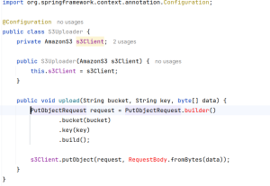
upload file to s3
Looks neat, right? But when I first tested something like this in a project, I realized:
- No error handling
- No retry policy
- No metadata or content-type handling
That’s when it clicked—GenAI drafts are great starters, but not production-ready.
Example Prompts for Java Developers
1.Generate a DTO from a request JSON
- I have this JSON request for an insurance product. Can you generate a Java DTO class with appropriate field types, getters, setters, and annotations for Jackson
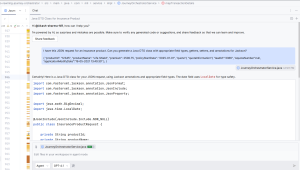
Generate DTO class with the help of ai agent
2.Debugging a stack trace
- Here’s a Spring Boot error I’m facing. Please explain the root cause in plain English and suggest a fix.
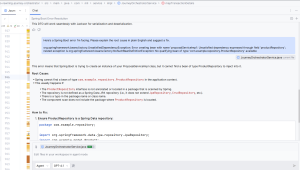
Debugging a stack trace
The Road Ahead
I don’t believe GenAI will replace strong Java developers. Instead, I see it changing our focus.
- Less time on boilerplate → more time on architecture
- Less time debugging → more time scaling apps
- Less copy-paste → more actual problem-solving
In 5 years, I wouldn’t be surprised if AI became a default teammate. Just like we can’t imagine coding without Git today, future developers may not imagine coding without GenAI.
Conclusion
GenAI isn’t magic, but it’s definitely a game-changer. For Java developers, it means fewer hours on repetitive work and more space to innovate.
Yes, it has flaws—unreliable snippets, occasional bad practices, and the risk of over-dependence. But with careful adoption, it’s one of the most exciting shifts in our field.
If you’re a Java dev and haven’t tried it yet, my advice is: start small. Let AI handle the grunt work, but keep your critical thinking sharp.
Next steps:
- Try it on your next Spring Boot side project.
- Use it to write unit tests or DTOs.
- Share your experiences with your team (you’ll be surprised how much they differ).
And who knows? Maybe your next 2 a.m. debugging session will end faster than you think—thanks to GenAI.