
Implementing Liquid Glass UI in Apple TV (tvOS)
Apple introduces a new design era for the user interface in WWDC25, called Liquid Glass. This modern UI design is evolving towards depth, transparency and layered visuals. Liquid Glass is a combined immersive effect of glass and fluid elements.
Liquid Glass is also known as frost glass or blur glass.
In this blog, I will explain everything about liquid glass with an example. So let’s get started…….
What is Liquid Glass UI?
Liquid Glass UI is a design style that uses transparency and background blur to create a frosted glass look.
Instead of using solid panels, it uses semi transparent layers so you can still see a bit of the background while clearly separating the main content in front.
Core Components of Liquid Glass UI
- Translucency – Semi transparent surface
- Background Blur – Frosted glass effect from content behind
- Depth & Elevation – Rounded corners, shadows, scaling
- Vibrancy (Optional) – Enhances text and icons for readability
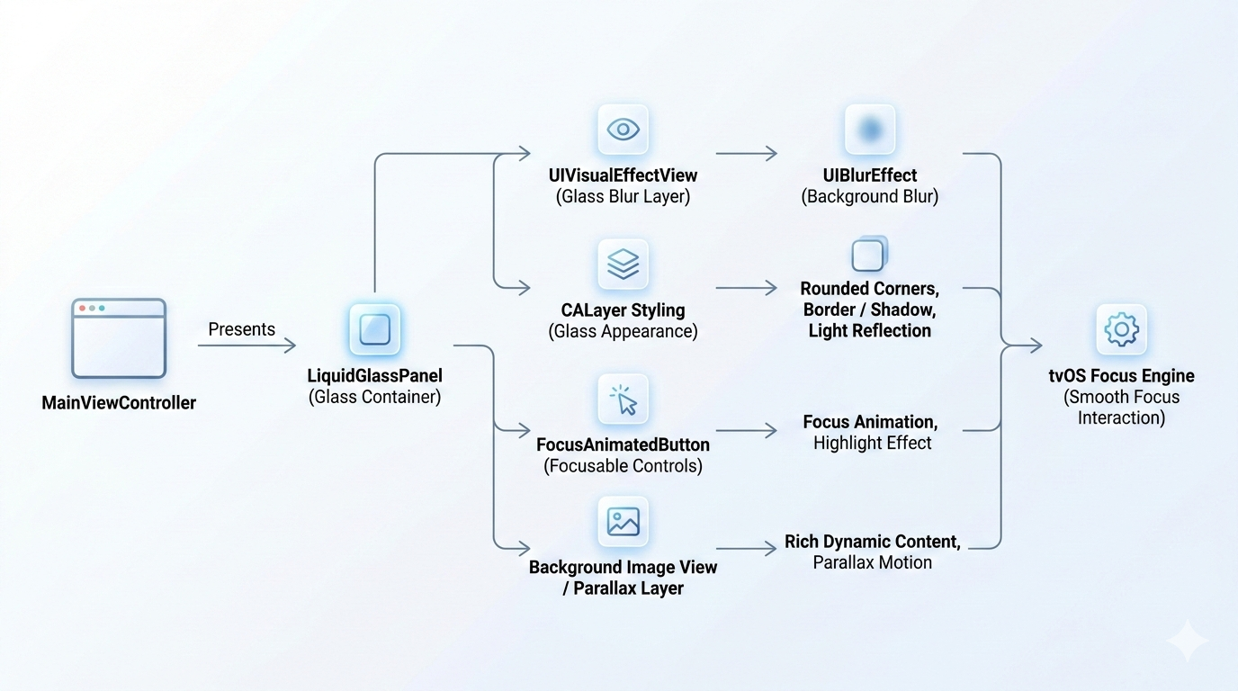
Liquid Glass Flow
Traditional UI vs Liquid Glass UI
| Traditional UI | Liquid Glass UI |
| Solid backgrounds | Blended with background |
| Clear separation from content | Dynamic and layered |
| Predictable but static | Feels modern and premium |
| Easier to implement | Requires design precision |
How to implement Liquid Glass Effect on UI Components
1. Creating the Glass Surface (Blur Layer) – This is foundation layer which used to create blur effect. Apple provides UIVisualEffectView class which is used to render real time blur effect on view.
class LiquidGlassView: UIView {

    private var blurView: UIVisualEffectView!

    override init(frame: CGRect) {
        super.init(frame: frame)
        setupGlassEffect()
    }

    required init?(coder: NSCoder) {
        super.init(coder: coder)
        setupGlassEffect()
    }

    private func setupGlassEffect() {
        let blurEffect = UIBlurEffect(style: .light)
        blurView = UIVisualEffectView(effect: blurEffect)
        blurView.frame = bounds
        blurView.autoresizingMask = [.flexibleWidth, .flexibleHeight]
        addSubview(blurView)
        layer.cornerRadius = 24
        clipsToBounds = true

    }
}
2. Adding Glass Border and Depth – CALayer is used to apply a border, shadow and corner styling, Which creates a depth and simulates real glass like look for UI components.
layer.borderWidth = 1
layer.borderColor = UIColor.white.withAlphaComponent(0.25).cgColor

layer.shadowColor = UIColor.black.cgColor
layer.shadowOpacity = 0.3
layer.shadowRadius = 20
layer.shadowOffset = CGSize(width: 0, height: 10)
3. Vibrancy for Text and Icons – UIVibrancyEffect is used provide vibrancy effects for text and icon above the blur background. Which helps to improve visibility and readability.
let vibrancyEffect = UIVibrancyEffect(blurEffect: UIBlurEffect(style: .light))
let vibrancyView = UIVisualEffectView(effect: vibrancyEffect)

vibrancyView.frame = bounds
blurView.contentView.addSubview(vibrancyView)
4. Focus Animation (tvOS Interaction) – Focus engine is used to navigate focus one to other UI Component.
override func didUpdateFocus(in context: UIFocusUpdateContext,
                             with coordinator: UIFocusAnimationCoordinator) {

   if context.nextFocusedView == self {
      coordinator.addCoordinatedAnimations({
         self.transform = CGAffineTransform(scaleX: 1.08, y: 1.08)
         self.layer.shadowOpacity = 0.5
      })
   } else {

   coordinator.addCoordinatedAnimations({
      self.transform = .identity
      self.layer.shadowOpacity = 0.3
   })
 }
}
Demo Project
This demo shows a simple Liquid Glass UI for tvOS using UIKit, with a transparent glass panel and blur effects. It also includes focus animations to create a smooth and engaging Apple TV experience.GitHub Link: https://github.com/shephaliTTN/Liquid_Glass_Demo

Demo: Liquid Glass UI
Pros and Cons of Liquid Glass UI
Pros:
- Modern and premium visual appeal
- Creates an immersive, engaging experience
- Keeps content (especially video) as the primary focus
- Smooth, fluid animations enhance interaction
Cons:
- Transparency can reduce readability in some cases
- Higher performance requirements (GPU-intensive effects)
- More complex to design and implement
- Requires careful balance to avoid visual clutter
Conclusion
Liquid Glass UI is more than just a visual effect, it is a combination of translucency, blur and depth that enhances how users perceive and interact with your interface. When implemented using system materials and best practices, it delivers a modern layered experience without compromising performance or accessibility.
The key is to use it thoughtfully keep it consistent, optimise for performance and ensure readability. Done right, Liquid Glass can significantly improve focus, hierarchy and the overall user experience of your application.
Happy coding!!!

