Why System Design Isn’t just for Tech Giants ( How you can actually learn it ).
Introduction
When I first stumbled across “System Design” about three months ago. I genuinely thought it was just another tech buzzword that only gray-haired architects at Netflix worried about. Well, I was wrong about that.
Why does this actually matter:
- System design separates code that barely limps along from code that actually survives in real-world use.
- It’s not just for tech giants – even small startups and internal tools need it.
- Understanding the skill changes how you approach every project.
- Real users will show up at the worst possible times, and your system needs to handle it.
What System Design Actually Means.
System design is essentially the blueprint stage before building anything:
-
- It’s about figuring out how your app’s pieces talk to each other.
- Deciding where data will live and how it flows.
- planning for what happens when you get thousands of users instead of ten.
- Preparing for when things break ( because something always breaks ).
The Scope Includes:
- High-level architecture decisions.
- low-level details like data structure and design patterns.
- Both functional requirements ( What it does ) and non-functional ones ( how well it does it).
Where you’ll actually need this
Real-world scenarios:
- Scaling Problems – Your app worked fine with 100 users, now you’ve got 10,000, and everything crashes at noon.
- Real-time applications – Chats app, ride-sharing platforms, and collaborative editors need solid design from day one.
- E-commerce platforms – Inventory management, payment processing, handling traffic surges during sales
- Microservices transition – Breaking up that giant, tangled monolith without creating more chaos
How to Learn System Design Effectively
Start with fundamentals:
- Understand functional and non-functional requirements.
- Functional = what users can do ( login, search, checkout ).
- Non-functional = how well it works ( speed, security, reliability)
Master the building blocks first:
- Databases and data storage patterns
- caching strategies
- load balancers
- APIs and communication protocols
- Don’t try designing Instagram before understanding these basics
Study real-world examples:
- How does Amazon survive Prime Day traffic?
- How does Uber match drivers in real-time?
- How do messaging apps deliver messages instantly?
- Real case studies teach more than abstract diagrams.
A Real System Design Example: Uploading a Photo on Instagram
Instead of inventing a fake system, let’s look at something everyone uses daily.
Uploading a photo on Instagram feels trivial. Under the hood, it wakes up a surprisingly large number of systems.
Let’s walk through one real action and see what happens.
High‑Level Instagram Architecture
Below is a simplified view of Instagram’s architecture, focusing on the path a request takes.

High-Level-Instgram-Architecture
This single flow already includes authentication, routing, storage, async processing, and global delivery.
Step‑by‑Step: What Happens When You Upload a Photo
Let’s say you tap Upload.
- API Gateway: Trust First
Your phone sends a POST /upload request.
The API Gateway:
– Verifies your JWT token
– Applies rate limits
– Rejects suspicious traffic
No authentication, no entry. This layer protects everything behind it. - Load Balancer: Find a Healthy Server
The request is routed through a Layer‑7 load balancer.
– Unhealthy servers are skipped
– Traffic is distributed evenly
– Failures are invisible to users.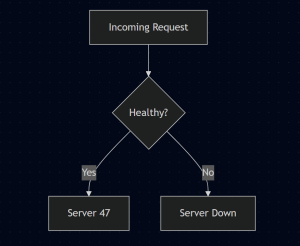
Find Healthy Server
- Media Service: Heavy Work Lives Here
This service:
– Compresses the image
– Generates thumbnails
– Creates multiple resolutions
Why separate this?
Because CPU‑heavy image processing should never slow down feeds, logins, or messaging. - Storage and Metadata
– Images go to object storage (S3‑like)
– Metadata goes to PostgreSQL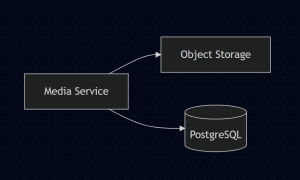
Large blobs and structured data live very different lives — and should never share the same database.
Fan‑Out: Updating Followers’ Feeds
A PostCreated event is emitted.
The Feed Service:
– Updates follower timelines
– Does this run asynchronously
– Never blocks your upload
This is why your post feels instant, even if millions follow you.
Database Layer Breakdown
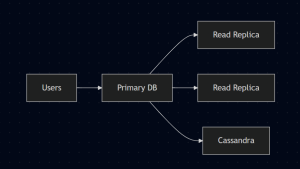
Instagram uses multiple databases for very intentional reasons.
- SQL for strong consistency (users, posts)
- Cassandra for massive fan‑out (feeds, notifications)
- Redis for everything temporary
- Caching: Why Instagram Feels Instant
Caching: Why Instagram Feels Instant
Instagram is fast because most requests never hit a database.
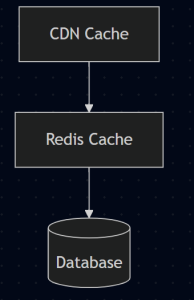
Result: ~95% of requests avoid the database entirely.
Fault Tolerance: Designing for Failure
Failures aren’t exceptions. They’re expected.
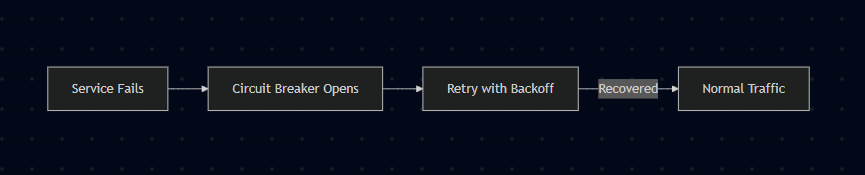
failure-tolerance
- Circuit breakers stop cascading failures
- Retries use exponential backoff
- Systems degrade gracefully instead of collapsing.
Monitoring: Seeing the System Breathe
Engineers don’t guess. They observe.

Every request is traced, logged, and measured.
If latency spikes, teams know where and why.
What Instagram Teaches About System Design
One simple feature demonstrates:
- Layered caching
- Service isolation
- Async processing
- Global distribution
- Failure‑first thinking
This isn’t overengineering. It’s survival.
Benefits Nobody Talks About
Beyond the obvious scalability:
- Better code reviews – When your team shares design vocabulary, discussions become productive instead of endless debates.
- Faster development over time – Reusing well-designed components saves weeks across projects.
- Fewer production bugs – Catching design flaws before coding means fewer 3 AM incidents
- Career acceleration – System design knowledge signals you’re ready for senior roles.
- Better technical communication – You can explain complex ideas clearly to stakeholders.
Conclusion
Getting Started Today
Your action plan:
- Pick one system you use daily (WhatsApp, Netflix, Spotify)
- Sketch how you think it works on paper.
- Ask yourself: where’s the data stored? How do messages travel? What handles traffic spikes?
- Find actual system design breakdowns online and compare with your sketch.
- learn from the differences
Remember these key points:
- System design isn’t magical – it’s a learnable craft
- You don’t need to be a genius architect to understand it.
- start small and stay curious.
- Design a system that seems above your current level ( that’s how you grow )
- Put in consistent work, and the patterns will click
Final thoughts:
Don’t overthink this part. The best way to learn is by doing. Every system you analyze, every design you sketch, every mistake you make – they all build your intuition. System design becomes second nature when you practice regularly. Start somewhere, anywhere, and keep pushing yourself to think bigger.